

Highlights
Brand new AI features!
This new INO cx version introduces 3 AI-powered features for recordings. See below for functional details and explanations. These features are available as a paid add-on — please contact your account manager for pricing and activation on your account.
Banner
- New AI feature: transcription, available for queue and voice campaign records (stereo mode only). Once the recording is complete, the transcript is available in the record details view. 3 possible statuses: in preparation, in progress, error.
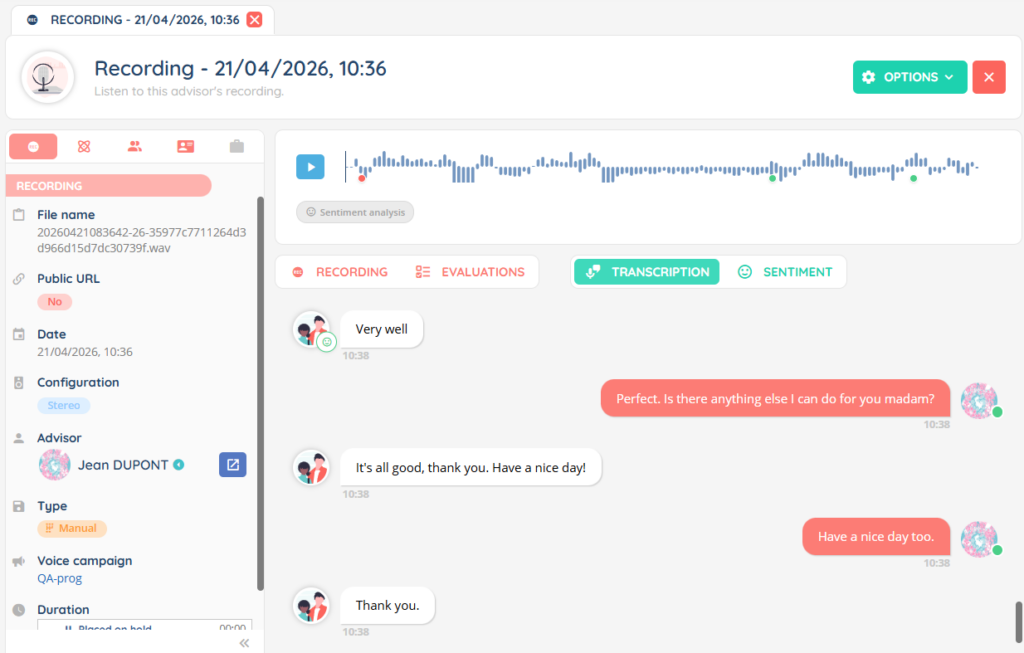
- New AI feature: transcription for smart and personal voicemailboxes with a setting to be activated in the Maker module and ‘My Account’ respectively. Once the transcription is complete, it can be copied, downloaded, and sent by email (if the parameter is enabled).
- All transcripts (queues, voice campaigns and voicemails recordings) include automatic language detection.
- AI summary for recordings is now available for queues and voice campaigns (stereo only). A minimum recording duration of 30 seconds is required to trigger the summary, and you can increase this threshold. Once the summary is available, it can be accessed in the record details view. Summaries can be modified by advisors if the right is activated on their profile. A detailed history of a summary’s modifications is also available.
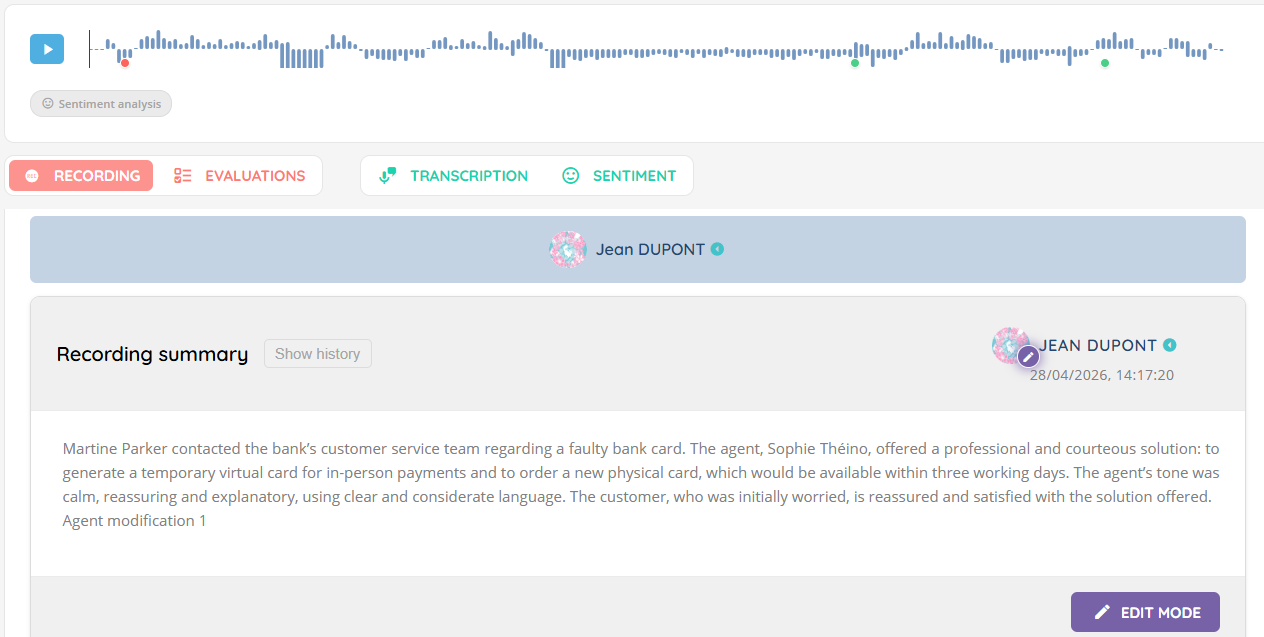
- AI summary is also available for smart voice messages. It can be activated in the smart voice mailboxes module of the Maker and works in the same way as for queues and voice campaigns.
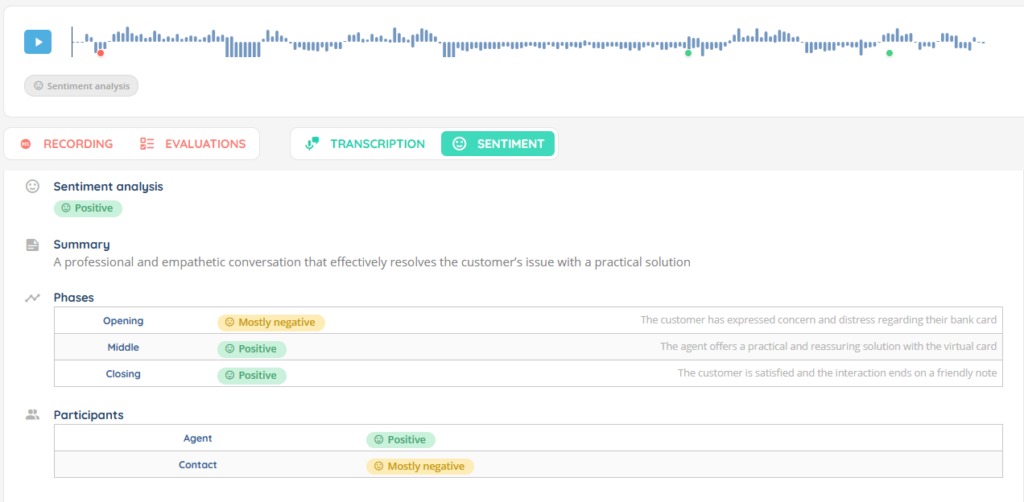
- New AI feature: sentiment analysis. At the end of a recording, once the transcript is available, a comprehensive sentiment analysis is displayed in a dedicated tab: how did the call go, was the overall mood positive or negative. A table with a detailed breakdown of the beginning, middle and end of the call is also provided. Optionally, if activated in the Maker, in the call transcript, red and green dots indicate negative and positive moments respectively: they are also displayed on the recording’s waveform, and clicking on one takes you to the relevant segment.
- In the details of a recording, the options button allows you to download the transcript in TXT format.
- The voicemail module in the Banner has been enhanced: it is now possible to open each voicemail to view its details (file name, audio, associated CRM card, transcript, etc.).
- NEW Regarding video calls: the voice interaction now remains active until the customer joins the video call. A button allows you to end the voice interaction manually if needed, before the customer has joined.
- NEW During the transfer of an interaction to a user, advisors’ activities are displayed under their names.
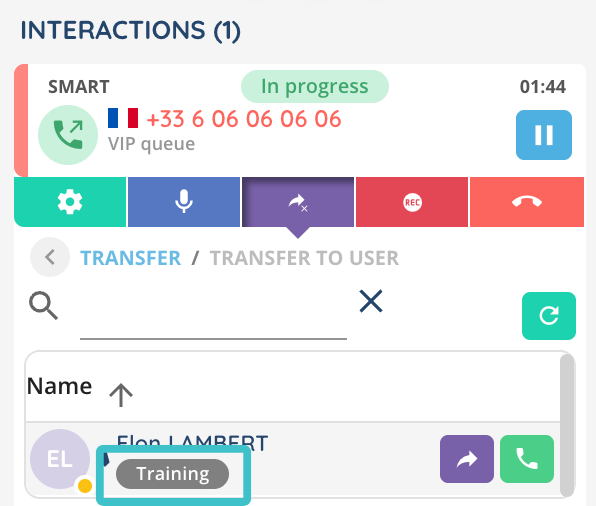
- NEW Interaction transfer to a user: the auto-acceptance setting now follows the receiving user’s profile (instead of the transferring user’s).
- In the Banner module (table mode), the case list now displays the first custom columns in the order defined in the Maker template linked to the active profile. The 4 system fields (reference, title, status, owner) always appear first and cannot be moved.
- NEW New setting in the profile: Enable simultaneous interaction distribution This allows multiple interactions to be presented to an advisor at the same time, while respecting the priority order of the flows defined in the profile. An advisor only receives interactions whose flow priority is equal to or higher than that of the interactions they are already handling. Interactions are presented one at a time (no double ringing): once one is accepted, the next can be presented immediately. Voice calls are an exception — only one call at a time is allowed, and while a call is in progress, no other interactions are presented.
Example with the following priority hierarchy: 1. Voice calls, 2. Instant messaging, 3. Email.
If an advisor is handling an email, they can still receive voice calls, instant messages and other emails.
If an advisor is handling an instant message, they can no longer receive emails, but can still receive a voice call or other instant messages.
This feature is disabled by default. - NEW New setting in the profile: Distribute messaging interactions up to the maximum. When enabled, a new messaging interaction is automatically assigned after each acceptance, up to the maximum number of simultaneous interactions. When disabled, only one messaging interaction is assigned automatically; the advisor then retrieves any additional interactions from the messaging pool themselves. This feature is disabled by default.
- NEW A new button Follow up on this conversation is now available in the interaction history module for outgoing emails. It reopens the original email in preview mode with the recipient’s details pre-filled, and all the usual features are available.
Maker
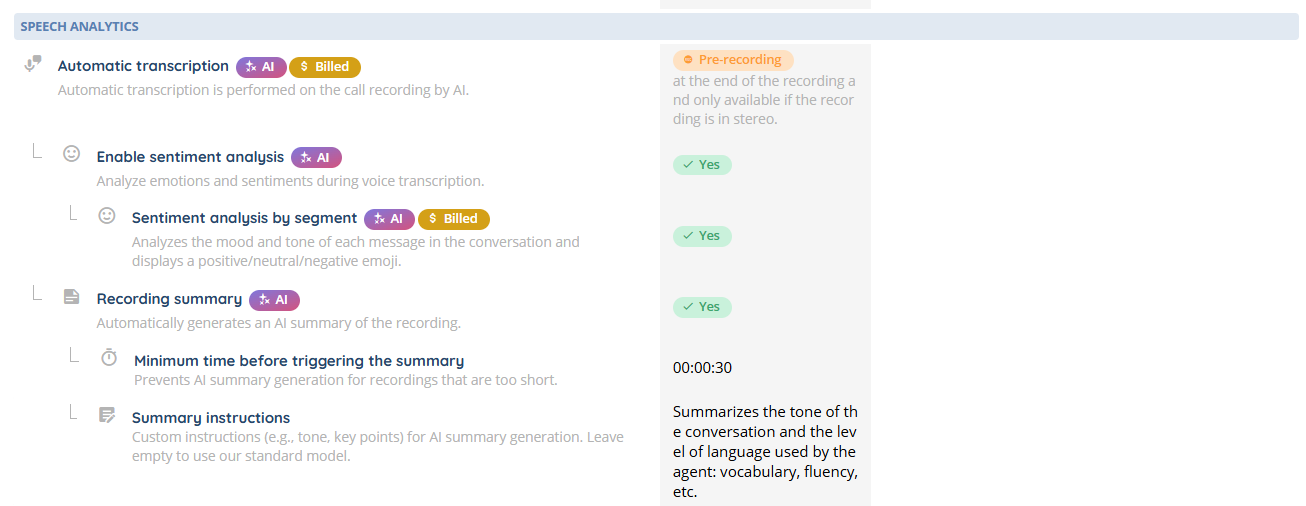
- New optional setting for queues and voice campaigns: AI summary custom instructions.
- A new setting allows you to choose the maximum number of simultaneous calls in power dialer campaigns (fixed or limited to the number of available advisors).
- In voice campaigns, an option allows you to set an expiration date for targets. Targets then automatically change to EXPIRED status.
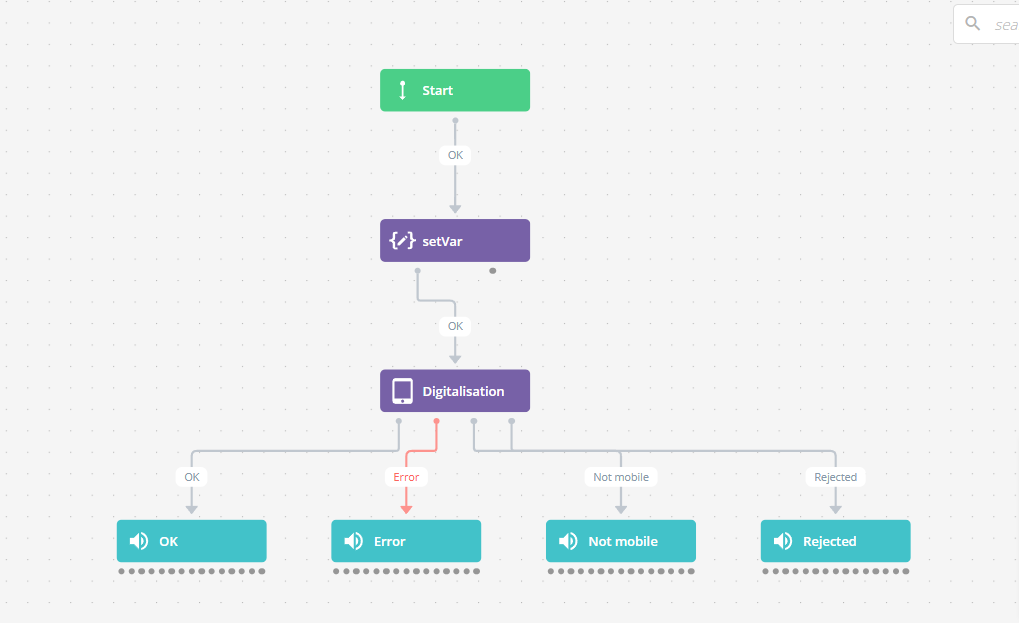
- Brand new display of routing trees (smart routings, surveys, scripts). Multiple new features have been added for a better UX: multi-links to the same target action, search bar, collapse/expand branches, coloured links depending on the link type, improved UI for creating new actions, etc. A progress bar showing remaining actions and a built-in pop-up for requesting a limit increase have also been added.
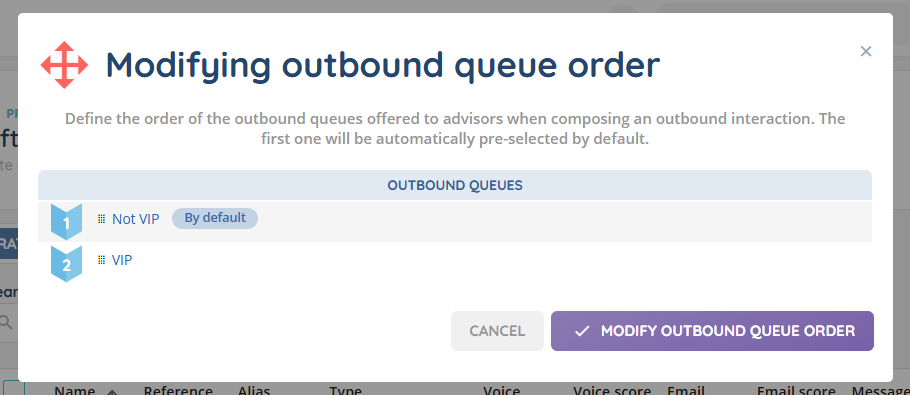
- In the profile, you can now customize the order of outgoing queues. The first one in the list will appear by default when an outgoing interaction is made in the Banner.
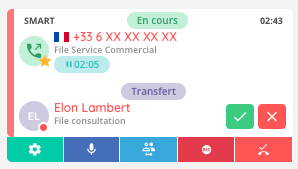
- A new right “Interaction Picking” has been added to queues and voice campaigns to enable or disable the “hand” button used to take an interaction in the small banner, pool of pending interactions, and supervision.
- New setting for voice attended transfers in queues and voice campaigns: either let the transferring advisor choose to stay in the call (conference) or hang up when releasing the transfer (default), or force an automatic hang-up on release.
Conferencing allowed
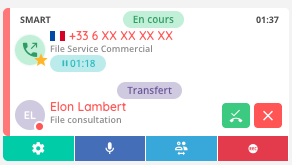
Conferencing disabled
- In incoming queues, a new “count abandoned” setting allows you to customize the SLA calculation.
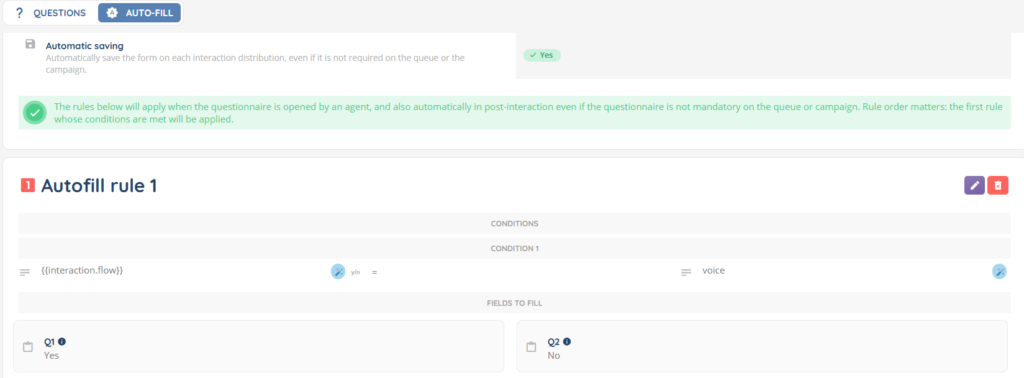
- A new tab in the qualification questionnaires allows you to define automatic filling rules, which enable questionnaires to be pre-filled for advisors. A new “Auto save” setting is also available when the interaction has not been taken.
- For Telegram, Messenger and WhatsApp messaging incoming interactions, a new magic field {{interaction.message.body}} allows you to retrieve a customer’s first message in a smart routing.
- For integrated CRM 2.0 card call-up scenarios, new conditions in interaction assignment have been added: transfer (yes/no), interaction status (processed, dissuasion, abandoned), campaign (yes/no), distribution status (processed, dissuasion, abandoned).
- When configuring a card call-up scenario, it is now possible to define up to 20 conditions per CRM object in card search, compared to 10 previously.

- Authentication methods can now be used in web services.
- Search, filter, and sort are now available when adding entities from multiple lists, such as teams for a user, users for a platform, activities for a profile, etc.
Supervision
- It is now possible to subscribe to discreet listening on a specific call in supervision.
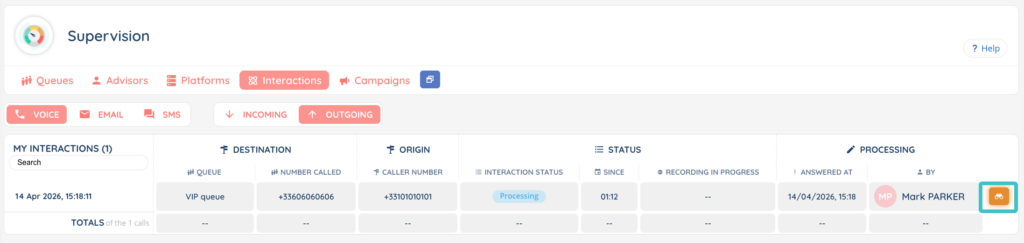
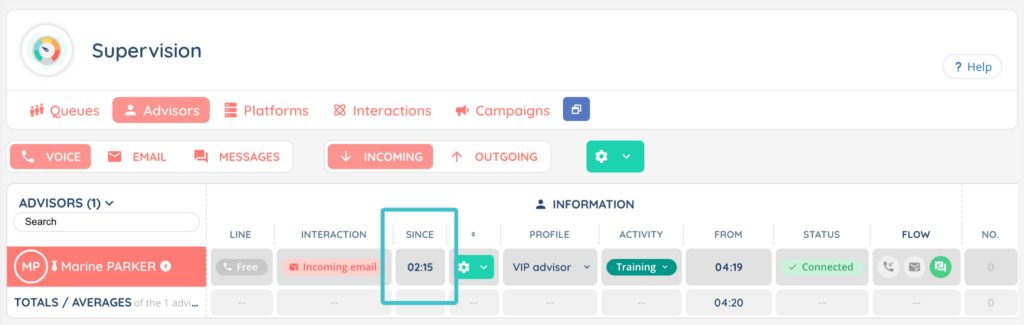
- In the supervision module, under the “advisors” tab, a new “since” column indicates how long the advisor has been interacting (omnichannel). In the “interactions” tab, under the “status” section, a “since” column has also been added.
- In the supervision, a new “Number of available advisors” column has been added. It displays the count of advisors whose flow is activated but who are not currently handling an interaction. The icon in the “Total number of competent advisors” column has also been updated to:

Reporter
- New KPI templates are available for live explorations.
- New KPI and calculated data templates are available for explorations.
- A new button allows you to export explorers in PNG or PDF format.
Connector
- Update of OAuth authentication for Zendesk and Salesforce to support the User/Service token architecture.
- Salesforce: adding the .ino.cx domain to trusted URLs settings of the package and replacing deprecated connected applications with external client applications.
- NEW Inclusion of the RecordType metadata for Salesforce CRM v2 (all objects). RecordTypes allow you, for example, to distinguish between different categories within the “Contact” object.
Additional changes
Maker
- All users created with SSO(s) now receive a welcome email with one (or more) SSO links.
- An explanatory label has been added to the smart routing action ‘Fill in the variables from the database’ to assist the user with the list type field.
- Entity duplication has been standardised to include sub-objects in all modules (except ‘Tags’).
- The WhatsApp numbers module has been updated: a new permission within the role grants access to a ‘Meta Configuration’ tab, which allows you to enter the META app credentials to set up the WhatsApp numbers more easily. It is now possible to use the same numbers for both incoming and outgoing interactions, and their management has been improved: statuses are displayed when there is an error or additional validation required, for example.
- WhatsApp is introducing the option for users to hide their phone number: they are then identified by a unique ID (called BSUID) and a display pseudonym, both supported by INO cx.
- Targets for campaigns (voice, SMS, WhatsApp) can now be imported using CRM v2.0.
Banner
- Each CRM card opened in the Banner now displays the following elements in the card’s header: CRM card name, CRM type, and object (if CRM v2.0).
- NEW When you open voice campaigns, the tab that appears by default is now Pending targets (instead of My voice campaigns).
- NEW Interaction history: search now works regardless of upper or lower case (particularly useful for email addresses) and also includes email subjects, in addition to the numbers and addresses shown in the contact column.
- New themed designs have been added to the login page: they are displayed based on the user’s country.
Reporter
- In data sources, several columns have been added or modified, and new fields have been added:
- Deleted columns
WARNING ⚠️ will be automatically removed from existing scheduled reports, public API, KPIs, calculated data, dashboards, explorations, etc.
| Datasource name. | Details | API key | Availability |
|---|---|---|---|
| Distribution | Mailbox | mailBoxId | v14 |
| Incoming email distributions | Mailbox | mailBoxId | v14 |
| Interaction | Mailbox | mailBoxId | v14 |
- New columns
Remember to add new columns to your data sources, explorations and scheduled reports.
WARNING ⚠️ automatically added to public API
| Datasource name | Details | API key | Availability |
|---|---|---|---|
| Interactions | WhatsApp campaign alias | whatsappCampaign.tag | v14 |
| Interactions | WhatsApp campaign session alias | whatsappCampaign.session.tag | v14 |
| Interactions | Voice campaign | voiceCampaign.name | v14 |
| Interactions | Voice campaign alias | voiceCampaign.tag | v14 |
| Interactions | Voice campaign session | voiceCampaign.session.name | v14 |
| Interactions | Voice campaign session alias | voiceCampaign.session.tag | v14 |
| Interactions | Voice campaign target ID | voiceCampaign.target.id | v14 |
| Smart Routing path | Entry point | (originValue) | v14 |
| Smart Routing path | Interlocutor | (endCustomerEndpoint) | v14 |
| Audio recordings | Call summary status | (resultAsyncSummary) | v14 |
| Audio recordings | Transcription status | (resultAsyncSpeechAnalysis) | v14 |
| Audio recordings | Stereo mix status | (resultStereoMix) | v14 |
| Audio recordings | External upload status | (resultExternalUpload) | v14 |
| Audio recordings | Sentiment analysis result | (sentimentAnalysis.overall) | v14 |
| Audio recordings (invoicing) | Call summary status | (resultAsyncSummary) | v14 |
| Audio recordings (invoicing) | Transcription status | (resultAsyncSpeechAnalysis) | v14 |
| Audio recordings (invoicing) | Sentiment analysis | (enableSentimentAnalysis) | v14 |
| Incoming calls | Smart routing start date | smartRoutingsHistory_startDate | v14 |
| Incoming calls | Smart routing end date | smartRoutingsHistory_endDate | v14 |
| Incoming calls | Smart routing time | smartRoutingsHistory_duration | v14 |
| Incoming calls | Last smart routing action | smartRoutingsHistory_smartRouting.smartRoutingActionId | v14 |
| Incoming calls | Smart routing type | smartRoutingsHistory_isEndSmartRouting | v14 |
| Incoming calls | Smart routing name | smartRoutingsHistory_smartRouting.name | v14 |
| Incoming calls | Smart routing version name | smartRoutingsHistory_smartRouting.version.name | v14 |
| Messages | Smart routing start date | smartRoutingsHistory_startDate | v14 |
| Messages | Smart routing end date | smartRoutingsHistory_endDate | v14 |
| Messages | Smart routing time | smartRoutingsHistory_duration | v14 |
| Messages | Last smart routing action | smartRoutingsHistory_smartRouting.smartRoutingActionId | v14 |
| Messages | Smart routing type | smartRoutingsHistory_isEndSmartRouting | v14 |
| Messages | Smart routing name | smartRoutingsHistory_smartRouting.name | v14 |
| Messages | Smart routing version name | smartRoutingsHistory_smartRouting.version.name | v14 |
| Incoming emails | Smart routing start date | smartRoutingsHistory_startDate | v14 |
| Incoming emails | Smart routing end date | smartRoutingsHistory_endDate | v14 |
| Incoming emails | Smart routing time | smartRoutingsHistory_duration | v14 |
| Incoming emails | Last smart routing action | smartRoutingsHistory_smartRouting.smartRoutingActionId | v14 |
| Incoming emails | Smart routing type | smartRoutingsHistory_isEndSmartRouting | v14 |
| Incoming emails | Smart routing name | smartRoutingsHistory_smartRouting.name | v14 |
| Incoming emails | Smart routing version name | smartRoutingsHistory_smartRouting.version.name | v14 |
| Interactions | Smart routing start date | smartRoutingsHistory_startDate | v14 |
| Interactions | Smart routing end date | smartRoutingsHistory_endDate | v14 |
| Interactions | Smart routing time | smartRoutingsHistory_duration | v14 |
| Interactions | Last smart routing action | smartRoutingsHistory_smartRouting.smartRoutingActionId | v14 |
| Interactions | Smart routing type | smartRoutingsHistory_isEndSmartRouting | v14 |
| Interactions | Smart routing name | smartRoutingsHistory_smartRouting.name | v14 |
| Interactions | Smart routing version name | smartRoutingsHistory_smartRouting.version.name | v14 |
| Call campaign targets | Rescheduling no. | progHistory_index | v14 |
| Call campaign targets | Rescheduling type | progHistory_type | v14 |
| Call campaign targets | Rescheduling date | progHistory_importDate | v14 |
| Call campaign targets | Target start date | progHistory_startDate | v14 |
| Call campaign targets | User | progHistory_userId | v14 |
| Call campaign targets | Workflow | progHistory_workflowId | v14 |
| Call campaign targets | Smart Routing | progHistory_smartRoutingId | v14 |
| SMS campaign targets | Rescheduling no. | progHistory_index | v14 |
| SMS campaign targets | Rescheduling type | progHistory_type | v14 |
| SMS campaign targets | Rescheduling date | progHistory_importDate | v14 |
| SMS campaign targets | Target start date | progHistory_startDate | v14 |
| SMS campaign targets | User | progHistory_userId | v14 |
| SMS campaign targets | Workflow | progHistory_workflowId | v14 |
| SMS campaign targets | Smart Routing | progHistory_smartRoutingId | v14 |
| WhatsApp campaign targets | Rescheduling no. | progHistory_index | v14 |
| WhatsApp campaign targets | Rescheduling type | progHistory_type | v14 |
| WhatsApp campaign targets | Rescheduling date | progHistory_importDate | v14 |
| WhatsApp campaign targets | Target start date | progHistory_startDate | v14 |
| WhatsApp campaign targets | User | progHistory_userId | v14 |
| WhatsApp campaign targets | Workflow | progHistory_workflowId | v14 |
| WhatsApp campaign targets | Smart Routing | progHistory_smartRoutingId | v14 |
| Interactions | Transfer type | distributionLife_transfer.type | v13.32 |
| Distributions | Transfer type | transfer.type | v13.32 |
| Incoming call distributions | Transfer type | transfer.type | v13.32 |
| Incoming email distributions | Transfer type | transfer.type | v13.32 |
| Incoming message distributions | Transfer type | transfer.type | v13.32 |
| Outgoing message distributions | Transfer type | transfer.type | v13.32 |
| Outgoing call distributions | Transfer type | transfer.type | v13.32 |
| Outgoing email distributions | Transfer type | transfer.type | v13.32 |
| Incoming calls | Transfer type | transfer.type | v13.32 |
| Incoming emails | Transfer type | transfer.type | v13.32 |
| Outgoing calls | Transfer type | distributionLife_transfer.type | v13.32 |
| Outgoing emails | Transfer type | distributionLife_transfer.type | v13.32 |
| Queues (Real-time) | Number of available advisors (voice flow enabled) | users.voice.avbI | 14.18 |
| Queues (Real-time) | Number of available advisors (email flow enabled) | users.email.avbI | 14.18 |
| Queues (Real-time) | Number of available advisors (messaging flow enabled) | users.messaging.avbI | 14.18 |
| Voice queues (Real-time) | Number of available advisors | users.voice.avbI | 14.18 |
| Email queues (Real-time) | Number of available advisors | users.email.avbI | 14.18 |
| Messaging queues (Real-time) | Number of available advisors | users.messaging.avbI | 14.18 |
| Scripts | Final answers n°X | uestion.uid of the question | v14.15 |
- New values
WARNING ⚠️ automatically affect existing scheduled reports, public API, explorations, KPIs, dashboards, etc.
| Datasource name | Details | API key | Availability |
|---|---|---|---|
| User’s interactions | in interaction status column, new value Error | status | 14.22 |
API, webhooks and workflows
- New public API routes for imports: retrieve imports, download import error, start an import, retrieve import fields, launch an import, save import filters.
- New webhook event: interaction:recording:summary:end.
- The “interaction put on hold” and “interaction on hold resumed” webhook events have been enriched with new fields: information about the advisor who triggered the action, the list of participants affected by the hold or resume, and the timestamp of the event.
And some bug fixes!
List of new and updated articles
Outbound SMS – Send from the Banner https://help.ino.cx/index.php/help-center/outbound-sms-send-from-the-banner/
Small Banner : an overview https://help.ino.cx/index.php/help-center/small-banner-an-overview/
Voice campaigns : Use them https://help.ino.cx/index.php/help-center/campaigns-tab-banner/
Voice campaigns – Set them up https://help.ino.cx/index.php/help-center/how-to-create-a-voice-campaign/
Target layout – Set them up https://help.ino.cx/index.php/help-center/target-layouts/
Real-Time (data source) https://help.ino.cx/index.php/help-center/real-time-data-source/
SIP endpoints https://help.ino.cx/index.php/help-center/sip-endpoints/
Entity groups https://help.ino.cx/index.php/help-center/entity-groups/
Queues – Set them up https://help.ino.cx/index.php/help-center/how-to-set-up-a-queue/
Statistics in the Banner – Use them https://help.ino.cx/index.php/help-center/statistics-in-the-banner-use-them/
Chat modules – set them up https://help.ino.cx/index.php/help-center/chat-modules-how-to-use-them/
Salesforce API connector https://help.ino.cx/index.php/help-center/salesforce-api-connector/
Transcription tab in Recordings https://help.ino.cx/index.php/help-center/speech-analytics-tab-in-recordings/
Sentiment analysis tab in Recordings http://help.ino.cx/index.php/help-center/sentiment-analysis-tab-in-recordings/
AI call summary in Recordings https://help.ino.cx/index.php/help-center/ai-call-summary-in-recordings/
Survey – Use them https://help.ino.cx/index.php/help-center/surveys-use-them/
Evaluations – Use them https://help.ino.cx/index.php/help-center/evaluations-use-them/
Scripts – Use them https://help.ino.cx/index.php/help-center/scripts-use-them/
WhatsApp numbers – Set them up https://help.ino.cx/index.php/help-center/whatsapp-numbers/
Chats in the messaging pool https://help.ino.cx/index.php/help-center/chats-in-the-messaging-pool/
SMS provider – Set it up https://help.ino.cx/index.php/help-center/sms-provider-set-it-up/