

Highlights
Connector
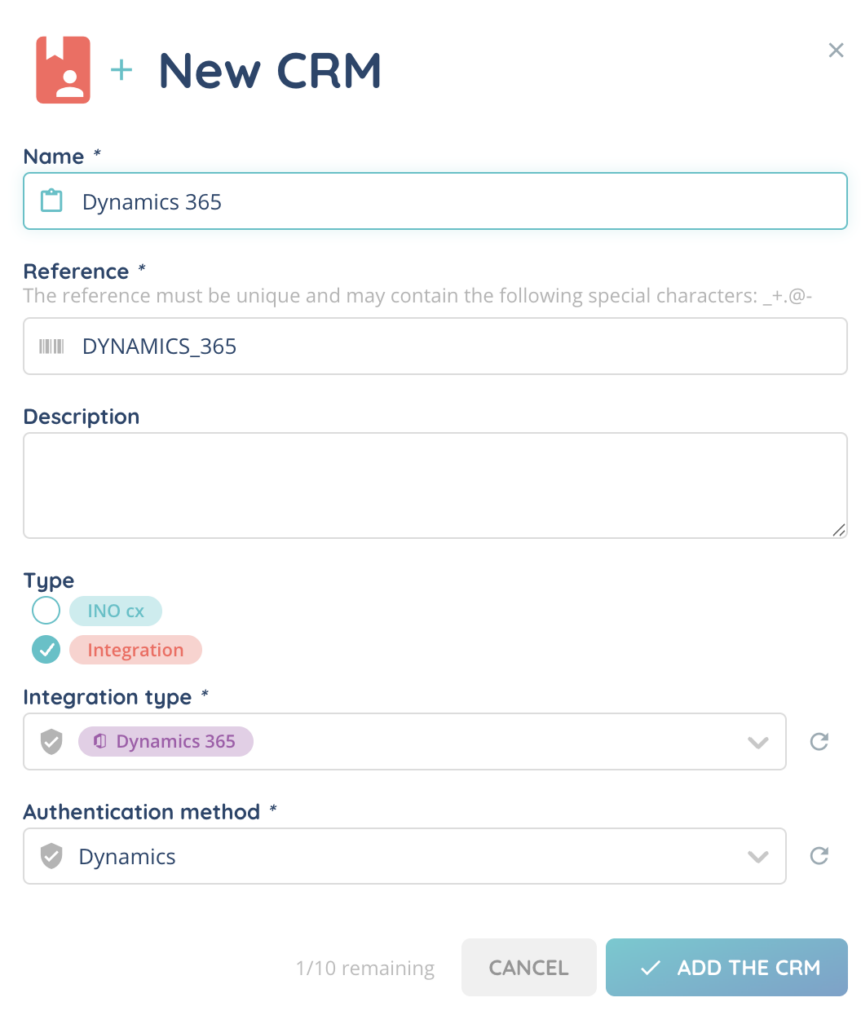
- Brand new CRM connector available (V2 only): MS Dynamics, with SSO connector support (OAuth2). All the usual features are available: activity logs, recordings, click-to-call, etc.
- Connector Hubspot is now available on CRM v2.0. Reminder: CRMs v2.0 bring same features as v1.0, along with multiple objects management, screen pop scenario with objects priority, Oauth SSO and customizable interactions logs.
- The Zendesk package has been updated to enable automatic connection of the INO CX banner, even if the agent doesn’t click on the top bar button. This autoload functionality will be triggered from the ticket, customer, user or organization view.
Reporter
- A new Real-time data source category has been introduced. It includes the following real-time data sources: Queues, Advisors, Voice campaigns, Voice queues, Email queues, Messaging queues, Voice advisors, Email advisors, and Messaging advisors.
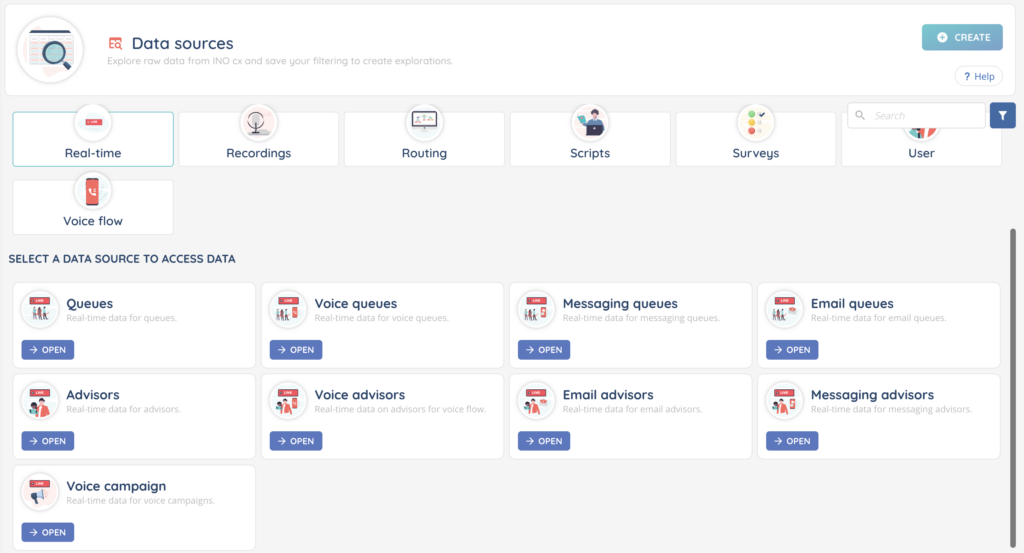
They allow you to create real-time explorations and live KPIs, which can then be used in dashboards and scenarios. These real-time KPIs are updated live.
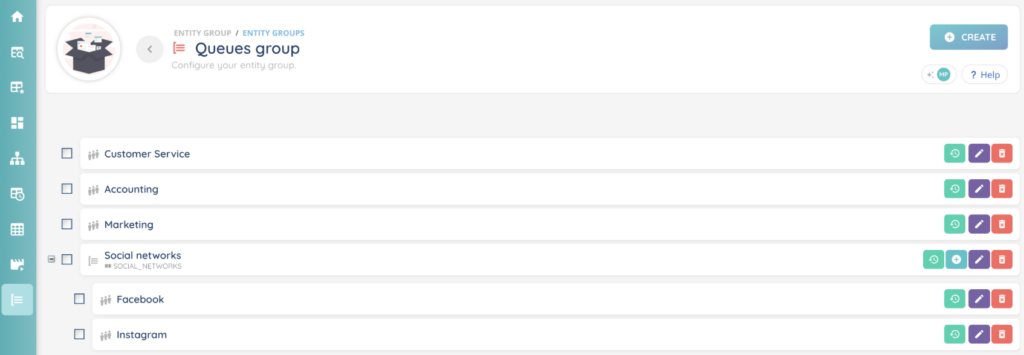
- New module entities groups: allows you to create groups and subgroups of queues, or voice campaigns, or users. You can define the order of each entity and subgroup. Entities groups can then be used in calculated data as a data group within KPIs of type table (advanced display mode only, see details below).
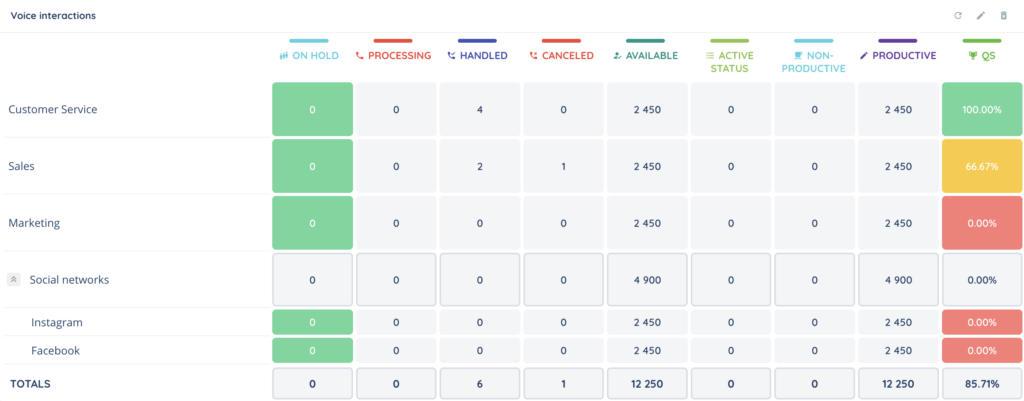
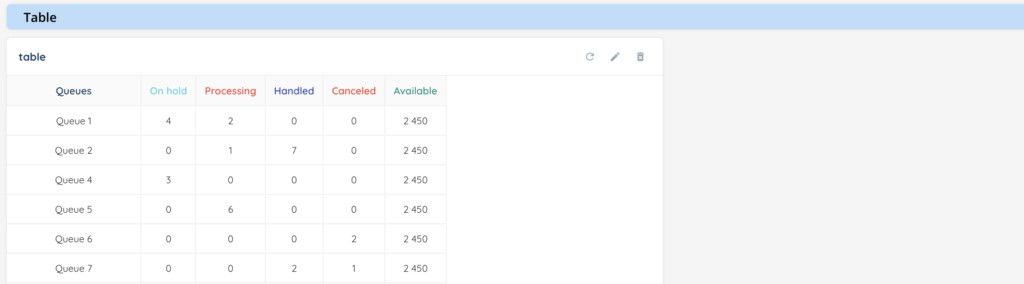
- Advanced display mode is now possible for KPIs of type “Table”. The main differences with simple display mode are:
- no pagination: all your data directly visible in the Table
- a different design with the last row displaying the total of the data
- an entities group can be assigned to enforce a fixed row structure and display subtotals (configured in the entities group)
- if an entities group of type Queues is assigned and the exploration is live, the following 3 columns will have automatic coloring (configured in the Maker on each queue): QS, waiting duration and the number of waiting interactions.
- The size of the lines, columns, and font adjust to the available space.
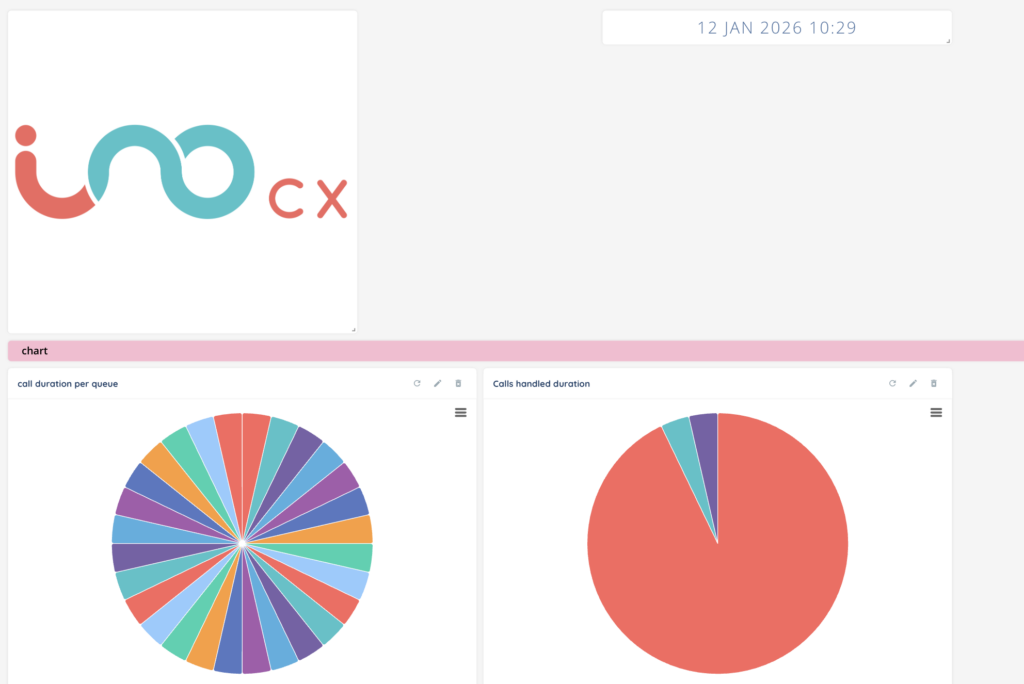
- 3 new elements in KPI types available for all explorations and dashboards:
- Image: displays an image or your logo, for example.
- Date: displays the date and time according to your format preferences.
- Section: displays a title to better organize KPIs within explorations and dashboards.
Banner
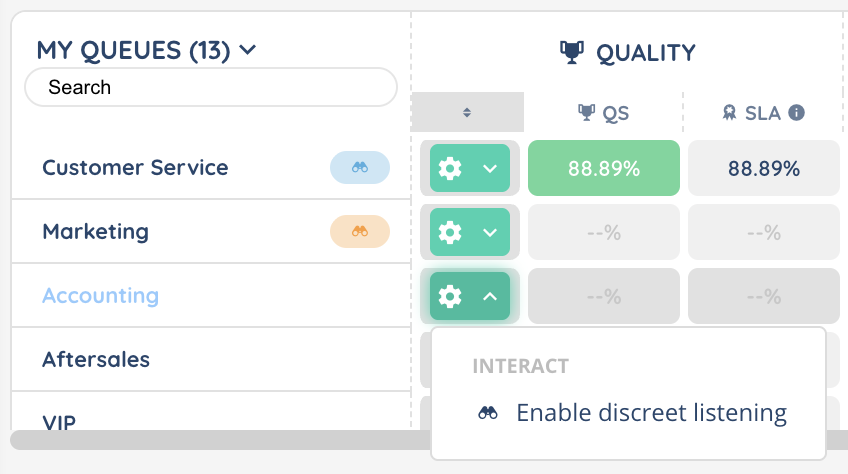
- Discreet listening can now be used for supervised queues and voice campaigns. It can be activated for managers on the active profile via a new parameter. Discreet listening calls can also be automatically accepted during presentation (with a customizable delay) (only available for webRTC). If the manager is not the advisor’s manager, the advisor’s name will be anonymized.
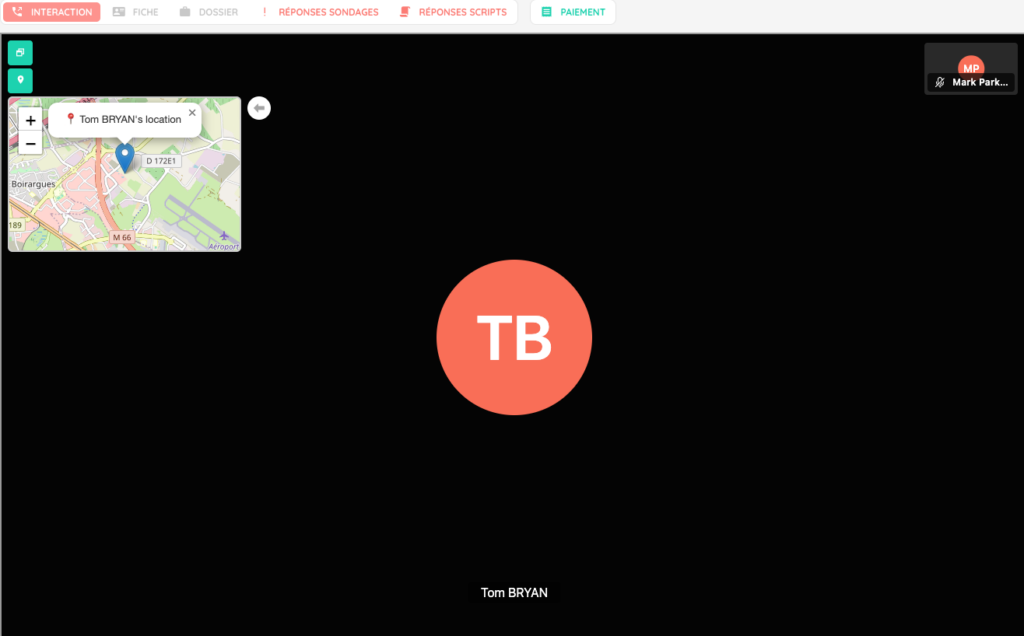
- During a video conference call, a button lets you request participants’ geolocation. If the customer agrees, a mini map with the participant’s name and location is displayed.
- During a messaging interaction of type “chat”, the agent can now use an HTML editor to format their text.
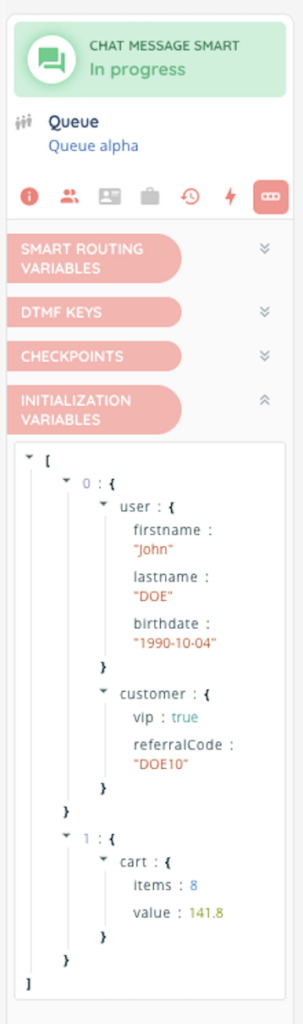
- In the chat plugin, you can now pass a JSON object with a text and/or an array of variables containing any type of row data. This data will be linked to the interaction and accessible on the Banner. The advisor treating the chat interaction will see the text on the conversation and variables will be displayed in the interaction’s variables panel.
Maker
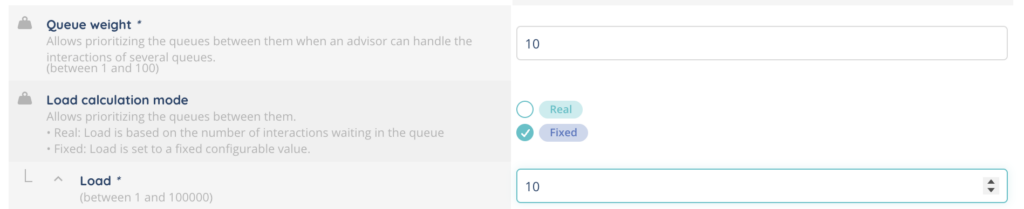
- A new parameter has been added to incoming queues to prioritize them. There are 2 calculation modes: fixed load and real load. The “fixed load” mode allows you to define a fictitious number of interactions waiting in a queue, while the “real load” mode is based on the actual number of interactions waiting in the queue. The load will be multiplied by the weight defined in the queue to determine the queue priority order.
- SFTP is now available on repository connectors.
- A new mTLS certificate type is available in the authentication methods module. This certificate can be selected in web services to encrypt data.
- New webhook event triggered when a scheduled report has been generated. Two possible statuses: report finished (sent successfully), report failed.
- New Smart Routing (voice only) and workflow action: insert a target into a WhatsApp campaign.
- New right in voice and SMS campaigns for short and premium-rate numbers (in addition to the existing right in the profile).
- New rights system for Supervision in the profile: each tab (queues, advisors, platforms, interactions, campaigns) has separate rights. Access to at least one tab is required for the module to appear in the Banner.
- New setting in the profile for discreet listening on supervised queues (only available to managers). If the manager listens to a call in a queue from an agent they do not supervise, the call is anonymised.
Additional changes
Maker
- Bulk imports and exports have been improved and optimized for better performance.
- Imports: now, when a line contains an error in an import, the report includes the entire line (making it easier to reimport once the error is corrected).
- Imports and exports for CRM v2.0 now include and support the card IDs column.
- The characters limit for a Smart Routing action reference has been increased from 45 to 255.
- In queues, maximum automatic acceptance of interactions can now be set to 10 seconds (compared to 5 seconds previously).
- In the profile configuration tab, a new “CRM right” has been added for CRMs v2. It has been separated from the “CRM right” for CRMs v1.
- The “SMS numbers” module is now called “SMS senders.”
Banner
- In the small banner, the running interactions now appear at the top of each tab.
- On the emails pool menu icon, there are now 3 different colored notification badges that indicate the number of email interactions in each type of pool (pending emails pool, my inbox pool and reviews pool).

- When an agent handles an interaction: their assigned station in the Supervision platform grid view turns red, and acts now like the background color of the advisor’s name. Previously, the station’s color during an interaction treatment remained the same as the agent’s activity color.
- In the small banner, under the “my statistics today” tab, the half pie chart colors have been improved to match the colors of the activity categories.
- In the Kanban view of cases, it is now possible to use the search bar, filters and advanced filters.
- New indication for number of unread messages during messaging interactions’ treatment. Appears as an “unread” border on the agent’s side, “read” with a small character and a small “seen” tick on the customer’s side.
- In the list of filters in CRM v2, it is now possible to filter by interaction IDs.
- Each CRM 2.0 card opened in the Banner now has its unique URL.
Reporter
- It is now possible to choose an icon for each column in KPIs of type Table (regardless of the display mode).
- In exports, the columns datasource and exploration have been added to indicate the origin of export data.
- In the exploration ‘partitioning’ tab, a label has been added next to the queue names to indicate the direction (incoming/outgoing).
- The arrangement of KPIs in explorations and dashboards is now preserved as is, even if there are empty spaces. Previously, any gaps were automatically filled in.
- New template KPI: Average ringing time. Available for the following data sources: distributions, incoming call distributions, outgoing call distributions.
- New calculated data for KPIs: Average ringing time. Available for the following data sources: distributions, incoming call distributions, outgoing call distributions.
- In explorers, a new button lets you open the view in full screen mode.
- In KPIs, for calculated data, filters are now based on Maker data (profiles, queues, users, etc.) rather than stats data.
Smart routing actions in the filter are now grouped by smart routing version for improved UX.
- In data sources, several columns have been added or modified:
- Deleted columns
WARNING ⚠️ will be automatically removed from existing scheduled reports, public API, KPIs, calculated data, dashboards, explorations, etc.
| Datasource name | Details | API key | Availability |
|---|---|---|---|
| Activity | Time spent in post-interaction | duration.postTreatment | v13 |
| Interactions | Mailbox ID | mailBoxId | v13 |
WARNING ⚠️: in the next major version (v14.0) other columns will also be removed.
| Datasource name | Details | API key | Availability |
|---|---|---|---|
| Distribution | Mailbox ID | mailBoxId | v14 |
| Interaction | Mailbox ID | mailBoxId | v14 |
| Incoming email distributions | Mailbox ID | mailBoxId | v14 |
- New columns
Remember to add new columns to your data sources, explorations and scheduled reports.
WARNING ⚠️ automatically added to public API
| Datasource name | Details | API key | Availability |
|---|---|---|---|
| Distributions | Distribution ID | id | v13 |
| Incoming call distributions | Distribution ID | id | v13 |
| Incoming email distributions | Distribution ID | id | v13 |
| Incoming message distributions | Distribution ID | id | v13 |
| Outgoing message distributions | Distribution ID | id | v13 |
| Outgoing call distributions | Distribution ID | id | v13 |
| Outgoing email distributions | Distribution ID | id | v13 |
| Incoming calls | Distribution ID | distributionLife_id | v13 |
| Messages | Distribution ID | distributionLife_id | v13 |
| Outgoing calls | Distribution ID | distributionLife_id | v13 |
| Incoming emails | Distribution ID | distributionLife_id | v13 |
| Outgoing emails | Distribution ID | distributionLife_id | v13 |
| Interactions | Distribution ID | distributionLife_id | v13 |
| Distribution | CRM v2 | interaction.crm.id | v12.10 |
| Distribution | CRM v2 object | interaction.crmObject.id | v12.10 |
| Distribution | CRM card ID | interaction.cardId | v12.09 |
| Incoming call distributions | CRM v2 | interaction.crm.id | v12.10 |
| Incoming call distributions | CRM v2 object | interaction.crmObject.id | v12.10 |
| Incoming email distributions | CRM v2 | interaction.crm.id | v12.10 |
| Incoming email distributions | CRM v2 object | interaction.crmObject.id | v12.10 |
| Incoming email distributions | CRM card ID | interaction.cardId | v12.09 |
| Incoming message distributions | CRM v2 | interaction.crm.id | v12.10 |
| Incoming message distributions | CRM v2 object | interaction.crmObject.id | v12.10 |
| Incoming message distributions | CRM card ID | interaction.cardId | v12.09 |
| Outgoing message distributions | CRM v2 | interaction.crm.id | v12.10 |
| Outgoing message distributions | CRM v2 object | interaction.crmObject.id | v12.10 |
| Outgoing message distributions | CRM card ID | interaction.cardId | v12.09 |
| Outgoing call distributions | CRM v2 | interaction.crm.id | v12.10 |
| Outgoing call distributions | CRM v2 object | interaction.crmObject.id | v12.10 |
| Outgoing call distributions | CRM card ID | interaction.cardId | v12.09 |
| Outgoing email distributions | CRM v2 | interaction.crm.id | v12.10 |
| Outgoing email distributions | CRM v2 object | interaction.crmObject.id | v12.10 |
| Outgoing email distributions | CRM card ID | interaction.cardId | v12.09 |
- Renamed columns (Reporter)
Does not affect existing scheduled reports nor public API, but only manual exports from the Reporter because translations changed.
| Datasource name | Details | API key | Availability |
|---|---|---|---|
| WhatsApp campaign attempts | WhatsApp message template ID | templateId | v13 |
API, webhooks and workflows
- New public API routes for databases: create an entry, edit an entry, delete an entry, empty the database.
- New workflow action: assign a CRM card. Identical to the existing action for smart routings.
- New workflow action: ‘Modify database values’ (identical to the smart routing action).
UX
- Throughout the application, wherever assignment/unassignment is mentioned, the wording has been replaced by association/dissociation.
- If a browser other than Chrome is used to connect to INO cx, an information box will be displayed.
Connector
- Added compatibility with the Salesforce Sandbox environment. To do this, enter https://test.salesforce.com in the ‘Environment’ field when creating an authentication method.
And some bug fixes!
List of new and updated articles
Web browser and WebRTC Prerequisites https://help.ino.cx/index.php/help-center/chrome-and-webrtc-prerequisites/
Authentication / reconnections / prerequisites https://help.ino.cx/index.php/help-center/authentication-reconnections-prerequisites/
MS Dynamics https://help.ino.cx/index.php/help-center/dynamics-365-api-connector/
SMS campaigns – Use them https://help.ino.cx/index.php/help-center/sms-campaigns-use-them/
SMS campaigns – Set them up https://help.ino.cx/index.php/help-center/how-to-create-an-sms-campaign/
INO cx Chrome extension https://help.ino.cx/index.php/help-center/ino-cx-chrome-extension/
Status sync – Set them up https://help.ino.cx/index.php/help-center/status-syncs-set-them-up/
Dashboards https://help.ino.cx/index.php/help-center/dashboards/
Explorers https://help.ino.cx/index.php/help-center/explorers/
Scenarios https://help.ino.cx/index.php/help-center/scenarios/
CRMs v2 – Set them up https://help.ino.cx/index.php/help-center/crm-v2-set-them-up/
Qualifications – Use them https://help.ino.cx/index.php/help-center/qualifications-use-them/
Customized buttons https://help.ino.cx/index.php/help-center/custom-buttons/
My voicemails (small banner) https://help.ino.cx/index.php/help-center/my-voicemails-small-banner/
My interactions (small banner) https://help.ino.cx/index.php/help-center/my-interactions-small-banner/
Conversations (small banner) https://help.ino.cx/index.php/help-center/conversations-small-banner/
SMS templates – Set them up https://help.ino.cx/index.php/help-center/sms-templates/
Zoho CRM API connector https://help.ino.cx/index.php/help-center/zoho-crm-api-connector/
History of interactions https://help.ino.cx/index.php/help-center/history-of-interactions/
Configuring single-sign-on (SSO) https://help.ino.cx/index.php/help-center/configuring-single-sign-on-sso/
Authentification methods – Set them up https://help.ino.cx/index.php/help-center/authentication-methods-set-them-up/
CRMs v2 – Use them https://help.ino.cx/index.php/help-center/crms-v2-use-them/
Zoho Desk API connector https://help.ino.cx/index.php/help-center/zoho-desk-api-connector/
Salesforce API connector https://help.ino.cx/index.php/help-center/salesforce-api-connector/
Zendesk support API connector https://help.ino.cx/index.php/help-center/zendesk-support-api-connector/
Messaging pool in the Banner https://help.ino.cx/index.php/help-center/messaging-pool-in-the-banner/
Client account settings https://help.ino.cx/index.php/help-center/client-account-settings/
Hubspot API connector https://help.ino.cx/index.php/help-center/hubspot-api-connector/
Databases – Set them up https://help.ino.cx/index.php/help-center/databases-how-to-use-them/
My statistics today (small banner) https://help.ino.cx/index.php/help-center/my-statistics-today-small-banner/
Voice mailboxes – Set them up https://help.ino.cx/index.php/help-center/voice-mailboxes/
Voicemail – Use it https://help.ino.cx/index.php/help-center/voicemail-use-it/
Recordings – Set them up https://help.ino.cx/index.php/help-center/recordings-set-them-up/
Recordings – Use them https://help.ino.cx/index.php/help-center/recordings-use-them/
Knowledge base and document center – Use them https://help.ino.cx/index.php/help-center/knowledge-base-and-document-center-use-them/
WhatsApp campaigns – Use them https://help.ino.cx/index.php/help-center/whatsapp-campaigns-use-them/