
Summary
Banner
- New feature: start a videoconference (from voice or messaging interactions). Once rights have been activated in both queue and profile, a new button appears in your interactions’ “Options” menu. For calls, the agent can generate an invitation link to be sent to call participants by SMS or email, and in all cases, the agent is automatically connected to the visio. Once the videoconference has been launched, the voice/messaging interaction ends.


Maker
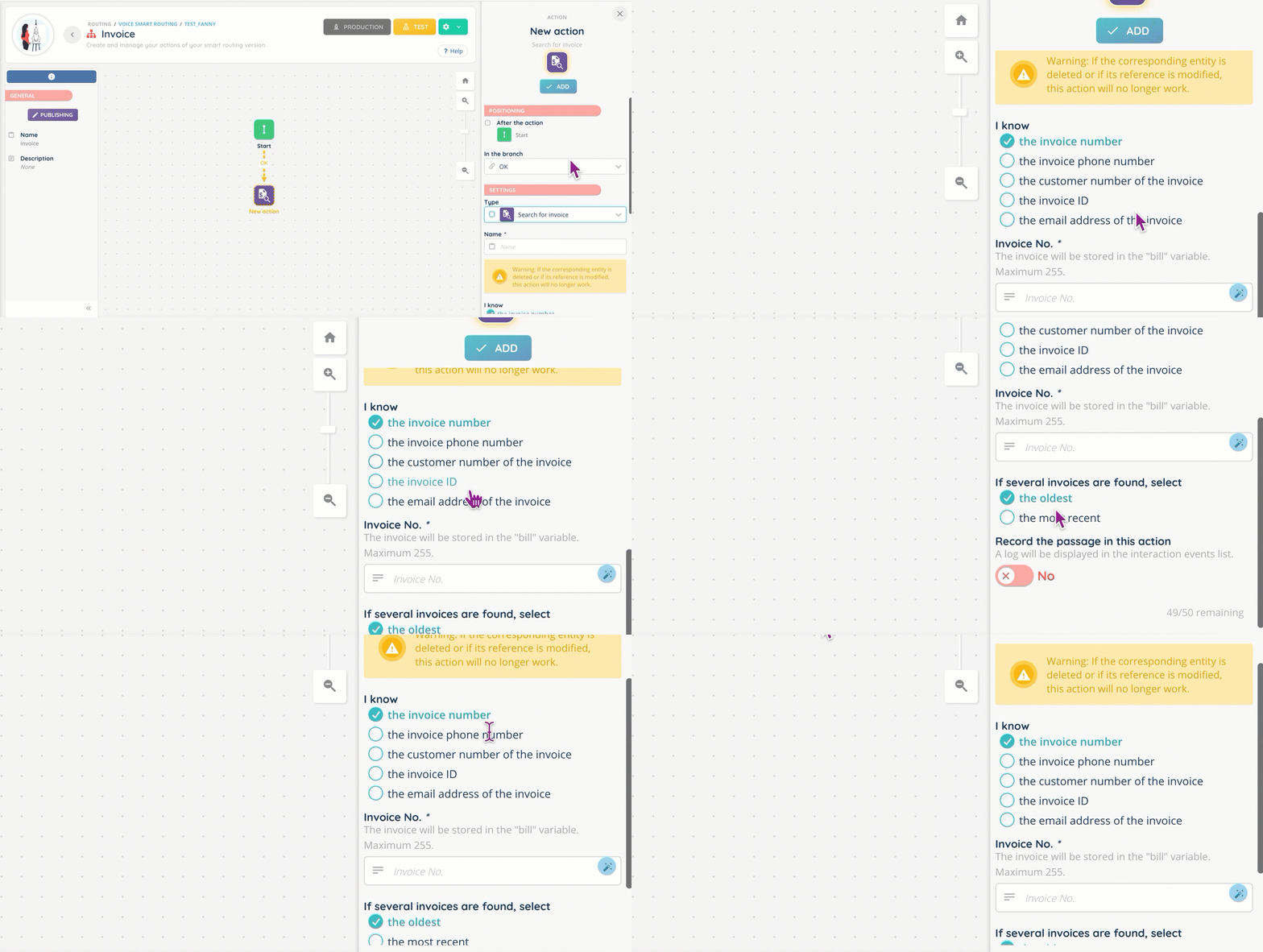
- New Smart routing action: search for an invoice. You can search by: invoice number, invoice ID, customer number, e-mail address and telephone number. If several invoices are found, it is possible to sort from the oldest to the most recent and vice versa.
- New public API routes for interactions and cases, with the following actions: retrieve an interaction, retrieve an interaction’s list of qualifications, retrieve an interaction’s records, retrieve information from one or several cases, create/modify/delete one or several cases.
- New public API route for retrieving speech analytics from a recording.
- New public API routes for retrieving data from data sources.
- New public API route for retrieving a campaign target information.
- For UX purposes, automatic subscription to voice campaigns is now only available in the activity (and no longer in the profile).
- Conditions added to “Interaction” customized buttons. There can be up to 10, which you can combine to adjust the visibility of the button.
Reporter
- New data source for all sent SMS (interactions by agents, from payment feature, from SMS campaigns, from smart routings, etc).

Additional changes
Banner
- New column (“Configuration”) and new advanced search parameters for recordings: mono/stereo, automatic/manual.
- More data in the “Sessions” tab: IP address and user agent.
- Super admin status: interactions’ history is now accessible independently of the active profile and team.
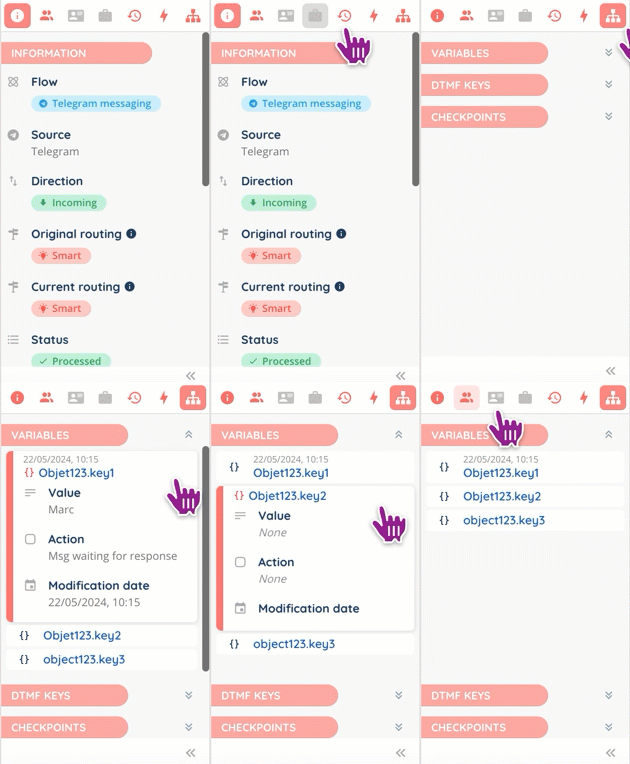
- Smart routing: a brand-new tab in the “Smart routing data” interaction page (progressing or history), where agents can view all variables set in the smart routing and their value at any time, DTMF keys, check points, etc.
Maker
- The Smart routing action “Pay an invoice” has been harmonized with “Search for an invoice”.
- Call transfer: in the customer account settings, it is now possible to choose the number you want to be displayed (original caller ID or custom for an external line, for example) when making external calls and transfers.
- For customized buttons: display conditions can now include the channel and direction.
- It is now possible to add “modify a voice campaign target” in the workflow triggers’ list via a webhook.
Reporter
Changes to data source columns: additions, deletions and renaming.
Agents
- Activities: new “Manager” column.
- Users‘ interactions: “Distribution/CRM card/Interaction identifier” are now “Distribution/CRM card/Interaction ID”.
Email flow
- Incoming emails:
- “ID” is now “Interaction ID”, “Sender ID” is now “Sender email address”.
- New “Email subject” and “Inbox” columns.
- Outgoing emails: same changes.
Messaging flow
- Incoming messages distribution:
- New columns “Messaging type”, “Call switched to video”, “Video call wait time”, “Video call duration”.
- Outgoing message distribution: same changes.
- Messages:
- “ID” is now “Interaction ID”, “Origin of session” is now “Messaging type”.
- Deleted columns: “Entry point type”, “Anchors”.
- New columns: “Correspondent”, “Checkpoints”, “Call switched to video (Distribution)”, “Video call wait time (Distribution)”, “Video call duration (Distribution)”.
Voice flow
- Incoming call distribution:
- New columns “Call switched to video”, “Video call wait time”, “Video call duration”.
- Outgoing call distribution: same changes.
- Incoming calls:
- “ID” is now “Interaction ID”.
- New columns “Call switched to video (Distribution)”, “Video call wait time (Distribution)”, “Video call duration (Distribution)”.
Multi flow
- Distributions:
- New “Messaging type” and “Manager” columns.
- “Customer number” is now ”Correspondent”.
- Interactions:
- “ID” is now “Interaction ID”, “Call date” is now “Interaction date”, column “Customer number” is now “Correspondent”.
- New columns: “Call switched to video (Distribution)”, “Video call wait time (Distribution)”, “Video call duration (Distribution)”.
- Deleted column: “Anchors”.
Payments
- Invoices:
- “ID” is now “Invoice ID”.
And some bug fixes.