
[Reading time: 3 minutes]
Overview
Definition & objectives
A post-interaction qualification questionnaire is a set of questions that agents fill out after an interaction.
Here are the possible objectives of such a questionnaire:
- Evaluate customer satisfaction: it allows for measuring the level of customer satisfaction following the call or interaction.
- Identify the nature of the request: it helps classify the type of request (technical, commercial, etc.) and verify whether it has been resolved.
- Quality of interaction: the questionnaire allows for assessing the quality of communication and the agent’s competence in handling the request.
- Plan follow-up: based on the responses, the company can determine if a follow-up or additional action is necessary to fully help the customer.
- Data collection for analysis: the data collected through these questionnaires is valuable for improving services, identifying friction points, and training agents.
They can involve all interaction channels (voice, message, email).
Find them in the Maker
You’ll be able to set them up in the Maker, in the Toolbox module, qualification questionnaires sub-module.
The qualification questionnaires are displayed in list form.
Using the search bar, you can search through the names of the questionnaires; search for questionnaires with a Tag; or create a new one.
Several actions are possible for each questionnaire:
- open (click on the arrow)
- duplicate, view history, dependencies and add tags (click on the cogwheel)
- modify it (click on the pencil)
- delete it (click on the bin)
Note: the bin will be greyed out if the questionnaire is used in a queue. Click on ‘dependencies’ if you want to see where.
Prerequisites
To grant users the necessary rights, remember to configure the rights in the Role module of the Maker.

In order to link the questionnaire to a queue, this queue must already have been created. In order to link the questionnaire to a voice campaign, this voice campaign must already have been created.
Note: please make sure that the post-interaction time is sufficient, so that the agent has time to answer the questionnaire. Otherwise, the questionnaire may not be completed in full.
Configuring (Maker)
Choose a name and create a new questionnaire, then open it.
You will be able to create all the questionnaire fields you want, which can be of several types (phone number, note, numeric…). If you choose the “list” type, be aware that the list has to be already setted up in the Toolbox “lists” module of the Maker.
Regular expressions (RegEx) can be used to impose a format on your field. For example, if you want a telephone number to start only with 06, or an email to be in the form text@text.text, etc.
Make sure to choose if this field is required or not.
Once you have created all your questions, they will be displayed in the form of a list. The order can be changed, as can the status (displayed or hidden).

Link it to a queue (Maker)
Go to Maker, the ‘Routing’ module and then the ‘Queues’ sub-module. Open the chosen queue, the settings tab and go to the ‘Options’ section.

For each channel, you can select the questionnaire of your choice from the drop-down menu, choose whether the questionnaire is presented automatically after interaction, and whether the questionnaire is required.
Note: required questionnaire is available only if you have selected a questionnaire and set the post interaction duration to ‘unlimited’.
Link it to a voice campaign (Maker)
Go to the Maker, the ‘Campaigns’ module and then the ‘Voice campaigns’ sub-module. Open the chosen voice campaign then adjust the settings like this
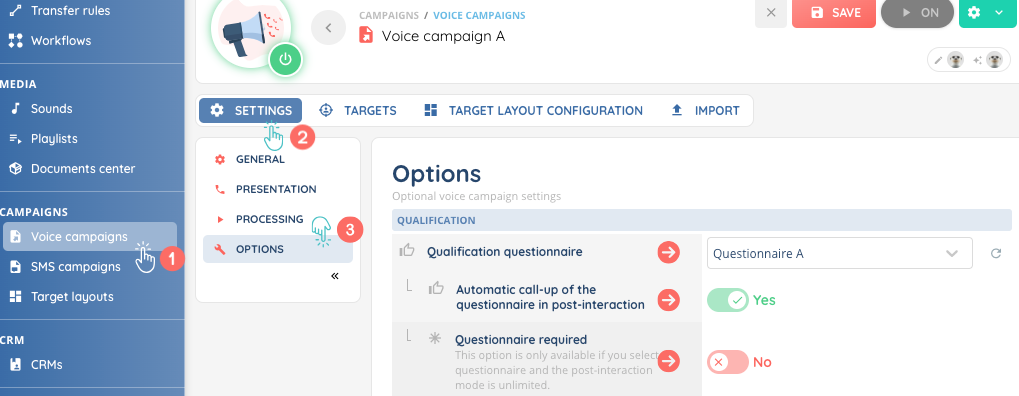
Questionnaires will only be available for voice campaigns.
You can select the questionnaire of your choice from the drop-down menu, choose whether the questionnaire is presented automatically after interaction, and whether the questionnaire is required.
Now agents and supervisors are ready to use them in the Banner!