

Highlights
Maker
- Brand new feature: CRM 2.0!

This new feature opens up a whole new range of possibilities for CRMs.
- Multiple objects: you can now group multiple objects together in a single CRM. As a result, you can define priority custom scenarios for CRM record screen pop.
- New sub-module: interaction assignment (omnichannel). This brand new system lets you choose fields with associated values to generate custom interaction logs with all the necessary information (ex: qualifications, queue, recording link, etc.).
- It is possible to associate these new CRMs with the profile, and also choose which objects will be associated with the profile for each CRM, with a default display option in the Banner.
All the 1.0 CRMs remain available on INO cx.
- New sub-module: authentication methods, which lets you set login credentials to connect external services to INO cx (examples of use: CRM 2.0 and status synchronization).
- A module has been created to manage status synchronization, currently available for Zendesk and MSO’s integrations. INO cx’s activities can be configured to be linked with Zendesk or MSO statuses. When the user status changes on Zendesk/MSO, INO cx user activity will change. Status synchronization can then be activated or deactivated in the profile, activities tab.

- A new SSO connectors module has been added to the data menu (previously defined in the customer global settings). It is now possible for a user to have multiple SSO connectors associated. Our solution also now supports OAuth in addition to SAML for SSO authentication.
- Click on marketing SMS numbers allows you to view and manage recipients who have used the STOP clause. Recipients can also be added manually to this list.
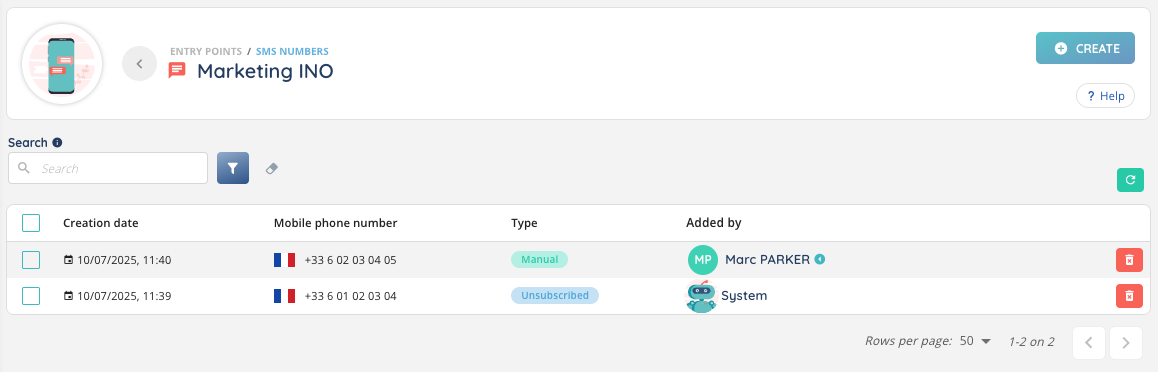
- Users on this list are automatically unsubscribed from current SMS campaigns using this SMS number. In campaign targets, a new “unsubscribed” status has been added.
- In the profile, a new parameter lets you prioritize voice flows according to 2 modes: grouped (which combines queues’ calls and voice campaigns’ calls) or separate.
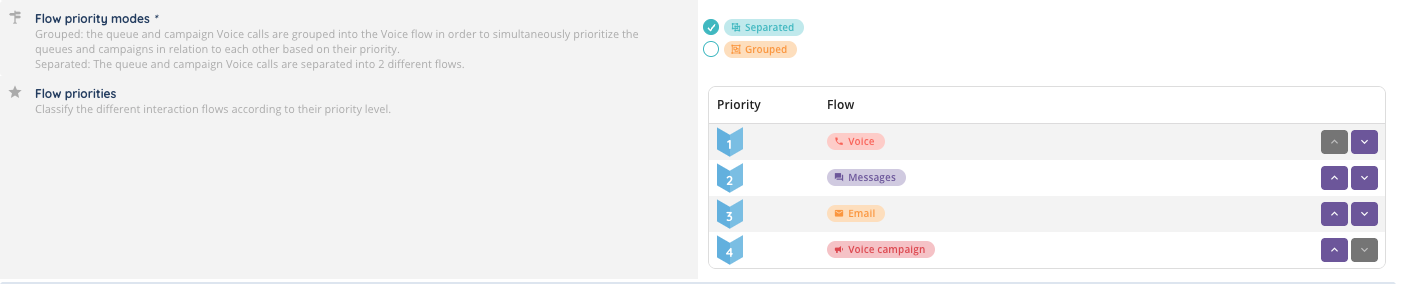
- In voice campaigns, weighting in % has been added for priority calculation. There are now 2 load calculation modes: fixed or real (= weighted).
- ⚠️ Please note that campaign groups now only concern power dialer campaigns.
- In ‘client account settings’ you can now add your logo, which will be displayed on all INO cx applications. By default, the INO cx logo is displayed.

- It is now possible to create display conditions and/or required conditions for cases’ fields.
- New Smart routing action (voice only): distribution to SIP endpoint. Once the endpoint has been added via the dedicated Maker sub-module (in the “toolbox” module), it is possible to distribute a call to a specific endpoint or reference.
Banner
- On the banner, URL now changes when navigating to entities pages.
- For voice campaigns in progressive mode: an optimization has been made to present a target to an agent immediately when an agent becomes available.
Reporter
- It is now possible to duplicate an exploration with its contents (including partitioning). User rights are not retained.
- In the Role, an ‘Export’ right has been added to explorations, differentiated from ‘Export’ right of data sources. By default, existing roles will have this right equal to data source export right. For new roles, default value will be false.
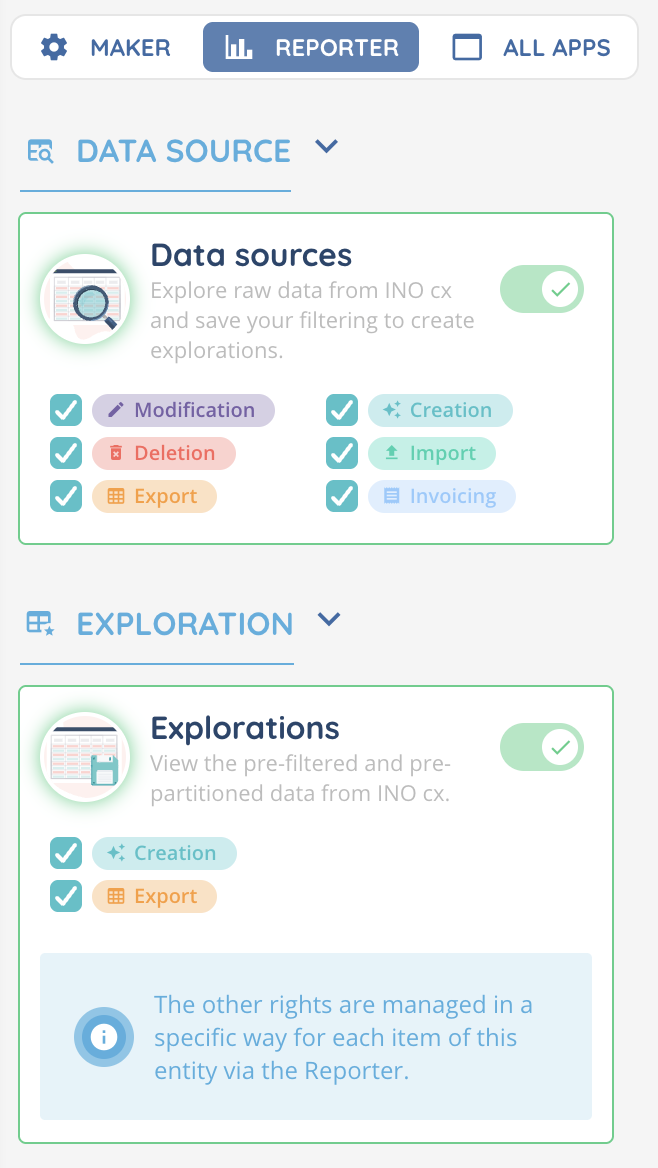
- New invoicing data source: WhatsApp campaigns.
- A new ‘getRawData’ true/false param has been added to the public API to obtain raw data. This param set to true will remove the formatting applied to the data (ID instead of names, money amounts in cents, durations unformatted). The default value is false.
- When you export in PNG or PDF format a KPI that has been filtered, the filters are now written below the KPI.
API, webhooks and workflows
- In the client account settings, in the webhook tab, a ‘history’ sub-tab has been added to show the history of webhooks over the last 3 months. A retry button will allow you to resend the event. To be able to retry, the ‘Execute’ right must have been granted in the role.

- There are now two systems that can be used in parallel with the public API in order to retrieve data from data sources: classic request to get the first X page results, and a new “requestid” method that retrieves much more data (at least 1000 per request) in a longer period of time. The filtering restrictions remain the same for both methods (e.g.: 3 sliding months for the date).
- New API protocol available for user routes only: SCIM – (System for Cross-domain Identity Management). Runs on bearer authentication.

- New API routes for 1.0 CRMs: create a CRM card, edit a CRM card, delete a CRM card, delete multiple CRM cards.
- New API routes for 2.0 CRMs:
- CRMs: get one/all CRMs
- CRM objects: get one/all objects, create/edit/delete/empty one object
- CRM object fields: get all fields, create/edit/delete one field, delete multiple fields
- CRM object Cards: get one/get all cards, create/edit/delete one card, delete multiple cards
Connector
- Salesforce Oauth connection will be available in the INO cx Salesforce Package v1.10, useful for CRM 2.0 and SSO user connection
Additional changes
Maker
- From the Maker user capsule, a direct link to the role and one to the current profile have been added.
Banner
- Entities are no longer displayed according to the current date: all elements are now displayed when the module is opened. Concerns the following functionalities: quality management (recordings, evaluations, qualifications, surveys, script answers), invoices, cases.
- New “Interaction identifiers” filter available for the following modules: surveys, evaluations, qualifications, recordings, scripts, invoices, cases, history of interactions. It can search for up to 10 interactions.
- It is now possible to send and receive Microsoft Office documents with a modern filetype extension (e.g., .docx instead of .doc) via messaging and collaboration tools.
- For voice interactions: the tab displayed during the presentation (script or CRM) no longer changes upon acceptation.
Reporter
- In some data sources (database, CRM, cases) the default date filters have been removed.
- The duration it takes to write an email adds up all the writing times that can be paused by draft saves.
- A new datasource has been created for CRM v2 cards.
- For the Incoming call distributions data source, a new data template has been added to the calculated data, as well as a new KPI template: “Number of unique incoming calls.”
- In data sources, several columns have been added or modified, and new fields have been added:
- Deleted columns
WARNING ⚠️ will be automatically removed from existing scheduled reports, public API, KPIs, calculated data, dashboards, explorations, etc.
| Datasource name | Details |
|---|---|
| Invoices | Order Id (orderId) |
| Invoices | Product Id (productId) |
WARNING ⚠️: in the next major version (v13.0) other columns will also be removed.
| Datasource name | Details (for v13.0) |
|---|---|
| Interactions | Mailbox name (mailboxId). Use origin.value. |
| Activities | Post-interaction time (postTreatment) |
- Renamed values
Does not affect existing public API but ⚠️ affects scheduled reports, explorations, KPIs, dashboards, etc.
| Datasource name | Details |
|---|---|
| Cases | in status column, for closed value (from status.value.terminated to status.value.closed) |
| Cases | in status type column, for closed value (from statusDetail.value.terminated to statusDetail.value.closed) |
| Interactions | in Detailed interaction status column, from “Agents” to “Users” (statusDetail.value.no_user) |
| Interactions | in Detailed interaction status column, from “Agents” to “Users” (distributionLife_statusDetail.value.no_user) |
| Distributions | in Detailed interaction status column, from “Agents” to “Users” (statusDetail.value.no_user) |
| Invoices | in Origin column, from “Agent” to “User” (processedOrigin.value.user) |
- New values
WARNING ⚠️ automatically affect existing scheduled reports, public API, explorations, KPIs, dashboards, etc.
| Datasource name | Details |
|---|---|
| SMS campaign target | in result column, new value STOP clause (result) |
| Incoming calls | in distributionLife_type, new value Distribution to SIP endpoint (DISTRIBUTION_SIP) |
| Outgoing calls | in distributionLife_type, new value Distribution to SIP endpoint (DISTRIBUTION_SIP) |
| Distributions | in type column, new value Distribution to SIP endpoint (DISTRIBUTION_SIP) |
| Interactions | in distributionLife_type, new value Distribution to SIP endpoint (DISTRIBUTION_SIP) |
| Incoming call distributions | in type column, new value Distribution to SIP endpoint (DISTRIBUTION_SIP) |
| Outgoing call distributions | in type column, new value Distribution to SIP endpoint (DISTRIBUTION_SIP) |
- New columns
Remember to add new columns to your data sources, explorations and scheduled reports.
WARNING ⚠️ automatically added to public API
| Datasource name | Details |
|---|---|
| User interaction presentations | Distribution type (distributionLifeItem.type) / values: queue distribution (DISTRIBUTION_QUEUE), queue group distribution (DISTRIBUTION_QUEUE_GROUP), user distribution (DIRECT_USER), external distribution (OUT) |
| User interaction presentations | Presentation duration (duration) |
| User interaction presentations | Detailed presentation status (reason) / values: “MISSED”, “REFUSED”, “CLEAN”, “FAILED”, “CANCELED”, “CONNECTING_TMO”, “BUSY”, “USER_DENIED_MEDIA_ACCESS”, “CONTACT_FAILED”, “UNALLOCATED” |
| User interaction presentations | Activity tag (activity.tag) |
| User interaction presentations | Interaction from transfer (fromTransfer.fromTransfer) / values : Yes(true), No(false) |
| User interaction presentations | Voice campaign (voiceCampaign.id) |
| User interaction presentations | Voice campaign alias (voiceCampaign.tag) |
| User interaction presentations | Manager (user.isManager) / values: false – Collaborator, true – Manager |
| User’s interactions | Manager (user.isManager) / values: false – Collaborator, true – Manager |
| User’s interactions | Queue (distributionQueue.id) |
| User’s interactions | Interaction status (status)/ values: “TREATED”, “CANCELED” |
| User’s interactions | Routing type (interaction.routing) / values : “SMART”, “DIRECT” |
| User’s interactions | Distribution type (distributionLifeItem.type) / values: queue distribution (DISTRIBUTION_QUEUE), queue group distribution (DISTRIBUTION_QUEUE_GROUP), user distribution (DIRECT_USER), external distribution (OUT) |
| User’s interactions | Activity tag (activity.tag) |
| User’s interactions | Interaction from transfer (fromTransfer.fromTransfer) / values : Yes(true), No(false) |
| User’s interactions | Transfered (transfered.transfered) / values: Yes (true), No (false) |
| User’s interactions | SMS template (smsTemplateId) |
| Audio recordings | Voice campaign (voicecampaing.id) |
| Audio recordings | Voice campaign tag (voicecampaign.tag) |
| Interactions | SMS template (smsTemplateId) |
| Interactions | DTMFs keys (dtmfs) |
| Interactions | Treatment duration (duration.treatmentWork) |
| Interactions | Treatment duration (distributionLife_treatmentWorkDuration) (for a distribution) |
| Interactions | Queue tag (distributionLife_distributionQueueTag) |
| Interactions | Entry point (origin.value) |
| Interactions | Origin of interaction (senderType) / values : USER, SYSTEM, SMARTROUTING, WORFLOW, PAYMENTMODULE |
| Interactions | Transfer duration (duration.transfer) |
| Interactions | Transfer duration (distributionLife.transferDuration) (for a distribution) |
| Incoming emails | Recipients’ email addresses (emailData.to.address) |
| Incoming emails | Recipients’ names (emailData.to.name) |
| Incoming emails | Copied recipients’ email addresses (emailData.cc.address) |
| Incoming emails | Copied recipients’ names (emailData.cc.name) |
| Incoming emails | Priority (emailData.priority) |
| Incoming emails | Treatment duration (duration.treatmentWork) |
| Incoming emails | Treatment duration (distributionLife_treatmentWorkDuration) (for a distribution) |
| Incoming emails | Queue tag (distributionLife_distributionQueueTag) |
| Incoming emails | Transfer duration (duration.transfer) |
| Incoming emails | Transfer duration (distributionLife.transferDuration) (for a distribution) |
| Outgoing emails | Recipients’ email addresses (emailData.to.address) |
| Outgoing emails | Recipients’ names (emailData.to.name) |
| Outgoing emails | Copied recipients’ email addresses (emailData.cc.address) |
| Outgoing emails | Copied recipients’ names (emailData.cc.name) |
| Outgoing emails | Priority (emailData.priority) |
| Outgoing emails | Treatment duration (duration.treatmentWork) |
| Outgoing emails | Treatment duration (distributionLife_treatmentWorkDuration) (for a distribution) |
| Outgoing emails | Queue tag (distributionLife_distributionQueueTag) |
| Outgoing emails | Transfer duration (duration.transfer) |
| Outgoing emails | Transfer duration (distributionLife.transferDuration) (for a distribution) |
| Outgoing emails | Origin of interaction (senderType) / Values: USER, SYSTEM, SMARTROUTING, WORFLOW, PAYMENTMODULE |
| Incoming email distributions | Transfer duration (transferDuration) |
| Outgoing email distributions | Transfer duration (transferDuration) |
| Outgoing email distributions | Origin of interaction (interaction.senderType) / Values: USER, SYSTEM, SMARTROUTING, WORFLOW, PAYMENTMODULE |
| Incoming message distributions | Transfer duration (transferDuration) |
| Outgoing message distributions | Origin of interaction (interaction.senderType) / Values: USER, SYSTEM, SMARTROUTING, WORFLOW, PAYMENTMODULE |
| Outgoing message distributions | Transfer duration (transferDuration) |
| Outgoing message distributions | SMS template (smsTemplateId) |
| Incoming call distributions | Transfer duration (transferDuration) |
| Outgoing call distributions | Transfer duration (transferDuration) |
| Distributions | Transfer duration (transferDuration) |
| Distributions | SMS template (smsTemplateId) |
| Distributions | Entry point (originValue) |
| Distributions | Origin of interaction (interaction.senderType) / Values: USER, SYSTEM, SMARTROUTING, WORFLOW, PAYMENTMODULE |
| Incoming calls | DTMFs keys (dtmfs) |
| Incoming calls | Treatment duration (duration.treatmentWork) |
| Incoming calls | Treatment duration (distributionLife_treatmentWorkDuration) (for a distribution) |
| Incoming calls | Queue tag (distributionLife_distributionQueueTag) |
| Incoming calls | Transfer duration (duration.transfer) |
| Incoming calls | Transfer duration (distributionLife.transferDuration) (for a distribution) |
| Outgoing calls | Treatment duration (duration.treatmentWork) |
| Outgoing calls | Treatment duration (distributionLife_treatmentWorkDuration) (for a distribution) |
| Outgoing calls | Queue tag (distributionLife_distributionQueueTag) |
| Outgoing calls | Transfer duration (duration.transfer) |
| Outgoing calls | Transfer duration (distributionLife.transferDuration) (for a distribution) |
| Outgoing calls | Country (endCustomer.country) |
| Outgoing calls | Country code (endCustomer.countryCode) |
| Messages | Treatment duration (duration.treatmentWork) |
| Messages | Treatment duration (distributionLife_treatmentWorkDuration) (for a distribution) |
| Messages | Queue tag (distributionLife_distributionQueueTag) |
| Messages | Transfer duration (duration.transfer) |
| Messages | Transfer duration (distributionLife.transferDuration) (for a distribution) |
| Messages | Origin of interaction (senderType) / Values: USER, SYSTEM, SMARTROUTING, WORFLOW, PAYMENTMODULE |
| Qualifications | Interlocutor (endCustomerEndpoint) |
| Qualifications | Queue tag (distributionQueue.tag) |
| Survey | Survey action name |
| SMS campaign targets | Number of attempts (nbAttempts) |
| Call campaign targets | Number of attempts (nbAttempts) |
| WhatsApp campaign targets | Number of attempts (nbAttempts) |
| Distributions | Processing time (treatmentWorkDuration) |
| Distributions | Distribution rank (index) |
| Incoming call distributions | Processing time (treatmentWorkDuration) |
| Incoming call distributions | Distribution rank (index) |
| Incoming email distributions | Processing time (treatmentWorkDuration) |
| Incoming email distributions | Distribution rank (index) |
| Incoming message distributions | Processing time (treatmentWorkDuration) |
| Incoming message distributions | Distribution rank (index) |
| Outgoing message distributions | Processing time (treatmentWorkDuration) |
| Outgoing message distributions | Distribution rank (index) |
| Outgoing call distributions | Processing time (treatmentWorkDuration) |
| Outgoing call distributions | Distribution rank (index) |
| Outgoing email distributions | Processing time (treatmentWorkDuration) |
| Outgoing email distributions | Distribution rank (index) |
- Renamed columns (Reporter)
Does not affect existing scheduled reports nor public API, but only manual exports from the Reporter because translations changed.
| Datasource name | Details |
|---|---|
| User’s interactions | from “Customer identification” to “Interlocutor” (interaction.endCustomerEndpoint) |
| Audio recordings | from “Call type” to “Routing type” (type) |
| Invoices | from “Payment type” to “Payment method” (dynamic.stages_type) |
| Interactions | from “Correspondent” to “Interlocutor” (endCustomer.endpoint) |
| Interactions | from “Telephone” to “Telephone type” (endCustomer.type) |
| Distributions | from “Correspondent” to “Interlocutor” (endCustomerEndpoint) |
| Incoming calls | from “Telephone” to “Telephone type” (endCustomer.type) |
| Outgoing calls | from “Telephone” to “Telephone type” (endCustomer.type) |
| Messages | from “Correspondent” to “Interlocutor” (endCustomer.endpoint) |
API, webhooks and workflows
- Now, the result of a statistics API request displays additional information for requests related to the Reporter: the page and the number of items in the dataset.
- New API routes are now available (Users > Teams > List users in a team, Add users to a team, Remove users from a team).
UX
- For ergonomic reasons, navigation in Maker and Reporter has been limited to 30 pages, regardless of the number of items per page.
And some bug fixes!
List of new and updated articles
- IVR recorder – set it up
- SMS numbers
- Email templates – Set them up
- Email templates – use them
- Scheduled reports
- Exports in the Reporter
- WhatsApp campaigns
- Output branches of distribution to queue action (voice smart routing)
- Calculated data customized (KPI)
- Explorations
- KPIs in explorations
- Web browser and WebRTC Prerequisites