

Highlights
Maker
- New mode for voice campaigns: preview. Before launching the call, the agent can preview the target’s info and get prepared for a defined duration. During this time, the agent can manually accept/launch the call or it will be automatically launched at the end of the preview duration.

- For voice campaigns: you can now choose a specific presentation number for every single target. If set, it will overwrite the general campaign parameter. The column has been added to targets’ import and is also available in the API route for adding/editing targets.
- New partitioning system for customized lists: for a given profile, it is possible to give access to specific elements in custom lists. For each element in custom lists, you can choose to put the list element (and its eventual sub-elements) accessible in read-only mode or with modification rights. Moreover, the display conditions tab can be used to further refine what will be presented to the agent.
- A new option is available for email and SMS templates: rights management for each template (read-only, modify before sending).
- For SMS: in profile and queues. If the agent is read-only, he can only fill in variables.
- For emails: in queues only. If the agent is read-only, he can only fill in variables, add more attachments and add more To, Cc, Bcc.
- Accompanied and blind transfer rights can now be activated and deactivated separately in the profile, for voice and messaging channels (default value for new profiles: No. – default value for existing profiles: same value as actual right)

- Changes to the right to refuse an interaction: in addition to the profile, it is also present in queues and voice campaigns (default value: Yes). For the agent to be able to refuse an interaction, this right must be activated in both the profile and the queue or voice campaign.
- Changes to the option Automatic acceptance of the interaction: can be activated either with the profile, the queue or the voice campaign (default value: No)
- Note: regarding email and messaging flow, the new options in queues/campaigns (“refuse an interaction” and “automatic acceptance of the interaction”) will only work for e-mail or messaging interactions received AFTER version 11 has been implemented.
- You can now choose which email domains users will be able to use to create their accounts.

- You can now click on your email address domains, in the client account settings, to view the email addresses that have not been reached (bounced or complaint recipients). They can also be added and deleted manually.
- In email templates, a new parameter can be activated to automatically add an “unsubscribe link” at the end of the emails.
- On the profile, 2 types of partitionings are now possible for cases access: by team (default) or conditioned. So you can now create display conditions on case fields in the profile.

- You can now create sections to better organize your case’s fields.

- For full-page cases’ layouts, you can now enlarge a field.

- WARNING: For directories, the document center and the knowledge base: if the agent doesn’t have full access in their profile, using the access rights management function on a folder gives now access to all its sub-elements.
Banner
- There are now two possible displays for cases in the Banner : Columns by status or Table. The default view is set in My Account > Preferences. On the Cases module, a new button lets you change the display.

- External email transfer has been modified and now offers two options: forward directly, or forward with added content.

- When trying to send an email to a blacklisted email address, the agent will get a red message.

Supervision
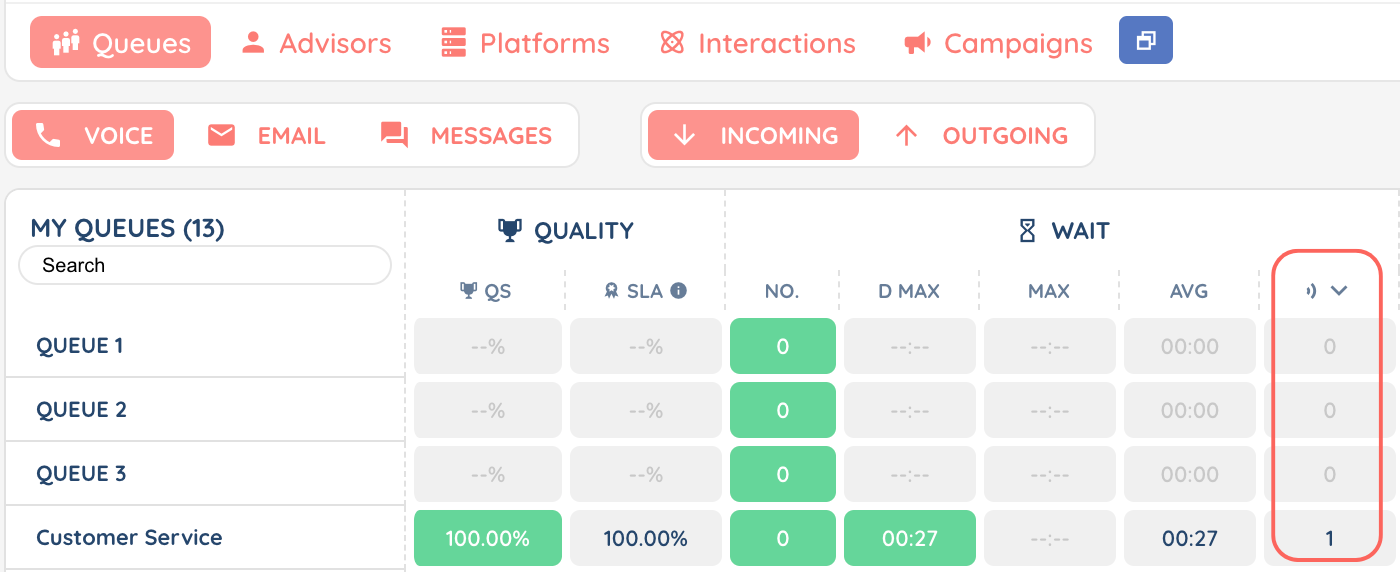
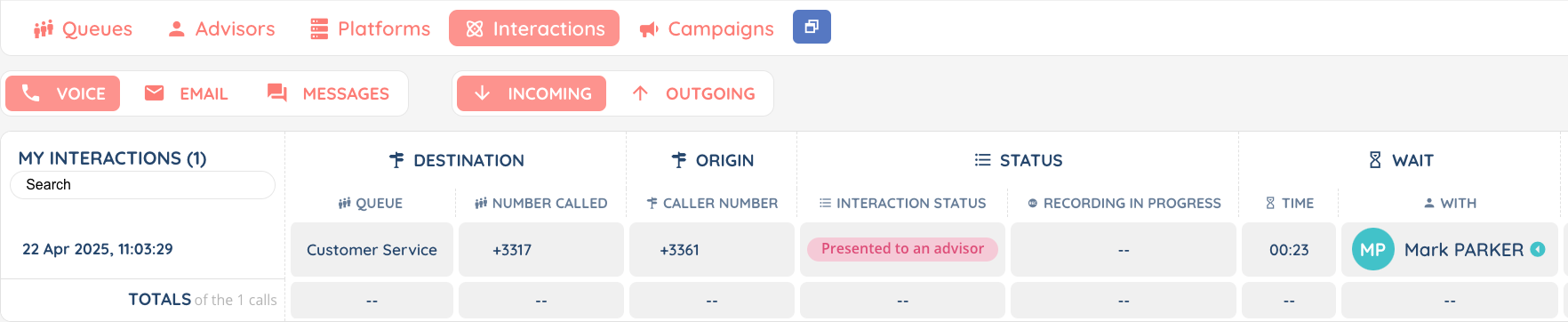
- In the supervision, “queues” tab, a column has been added under the “wait” section, for the number of interactions in presentation. In the “interactions” tab, in the “interaction status” column, a status “presented to an advisor” has been added. In the same tab, a “with” column has been added to indicate which advisor the interaction is with.
Reporter
- Dashboards and all their content (KPIs, etc.) can now be duplicated. Only the list of dashboard users will not be duplicated.
- A new “status of sent emails” data source has been created.
- In an Exploration, under “KPIs” tab, a new button now lets you directly create a dashboard by selecting wanted KPIs from the exploration.

Connector
- In Zendesk and Salesforce, the icon of the agent’s main activity will change while he is using the INO cx integration. This icon changes if an agent is online, in a call, handling an email, a messaging, different interactions or disconnected. Read the dedicated article here.
UX global
- The prerequisites check page has been improved, with the addition of two sections “STUN” and “System”.
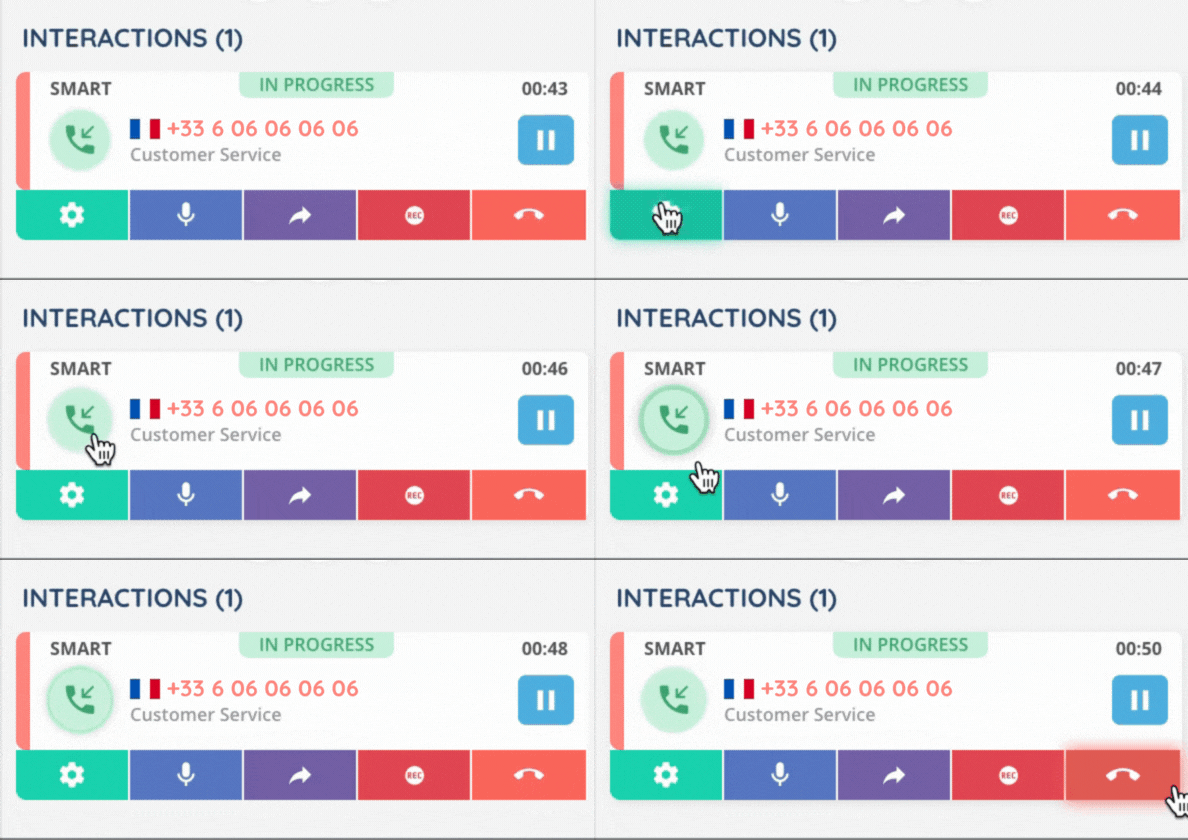
- During a call, a highlighted visual indicator appears when the agent is speaking into the microphone, in the agent’s small banner interactions list.
Additional changes
Maker
- In email templates, the total sum for email addresses can now be up to 50, all included (to, cc, cci).
- In the list of case fields, a new “customized list” column has been created, with a link to the related list.
- When creating and modifying a case field, you can set a tooltip which will then be displayed in the Banner.
- In user accounts, countries are now differentiated from languages. The languages available in INO cx are now English, Spanish and French.
Banner
- The UX has been enhanced to clarify the options panel close button, the transfers panel close button and the end interaction button.


- In the tasks list, a new “Private” column (YES/NO) has been added, with the option of filtering.
Reporter
- In the Reporter, when adding users to an entity (exploration, dashboard, explorer, …), the list of users to add is now presented as a drop-down menu with the possibility of searching.
- For data sources in which it is possible to add “multiple” columns (see list below), each column after its name has a numbered indication as such: distribution n°1, transaction n°2, etc. The following data sources are concerned:
- incoming calls
- outgoing calls
- incoming emails
- outgoing emails
- messages
- interactions
- scripts
- invoices
- call campaign targets
- SMS campaign targets
- In data sources, several columns have been added or modified :
- The additional columns available for some data sources (see the full list above) are labelled to show the precise position of the column used.
- New columns
Remember to add new columns to your data sources, explorations and scheduled reports.
WARNING ⚠️ automatically added to public API
| Datasource name | Details |
|---|---|
| Outgoing calls | Time spent in smart routing (duration.svi) |
| Invoices | Card holder (transactions_cardName) |
| Incoming calls | External number (distributionLife_endpoint) |
| Incoming call distributions | External number (endpoint) |
| Outgoing emails | Email id (emailData.id) |
- Renamed columns (Reporter)
Does not affect existing scheduled reports nor public API, but only manual exports from the Reporter because translations changed.
| Datasource name | Details |
|---|---|
| Incoming calls | from processing time to communication time (treatmentDuration) |
| Outgoing calls | from processing time to communication time (treatmentDuration) |
| Incoming call distributions | from processing time to communication time (duration.treatment) |
| Outgoing call distributions | from processing time to communication time (duration.treatment) |
| Incoming emails | from processing time to writing time (treatmentDuration) |
| Outgoing emails | from processing time to writing time (treatmentDuration) |
| Incoming email distributions | from processing time to writing time (duration.treatment) |
| Outgoing email distributions | from processing time to writing time (duration.treatment) |
| Messages | from processing time to exchange time (treatmentDuration) |
| Incoming message distributions | from processing time to exchange time (duration.treatment) |
| Outgoing message distributions | from processing time to exchange time (duration.treatment) |
| Distributions (Multi flow) | from processing time to exchange time (duration.treatment) |
| Interactions (Multi flow) | from processing time to exchange time (treatmentDuration) |
Connector
- The Salesforce package has been updated, with the addition of a Record URL field in call activity logs. The new version can be installed without deleting data from the previous version. The URL to use is: https://login.salesforce.com/packaging/installPackage.apexp?p0=04tJ7000000gP5i Note: You can either use this URL for a normal new installation, or to update an existing version.
And some bug fixes!