
[Reading time: 2 minutes]
Overview
The “Phone numbers” module allows you to view and configure incoming phone numbers used in your INO cx environment. These numbers are added by the INO teams and cannot be created or deleted by customers.
Accessing the module
-
Go to the Maker.
-
Navigate to Entry points > Numbers.
-
You will then see a list of all available phone numbers.
Adding a phone number
Phone numbers are exclusively added by the INO teams. If you need a new number, you must contact your INO cx support team to have it assigned to your environment. Once added, the number will automatically appear in the entry points list.
Interface and available options
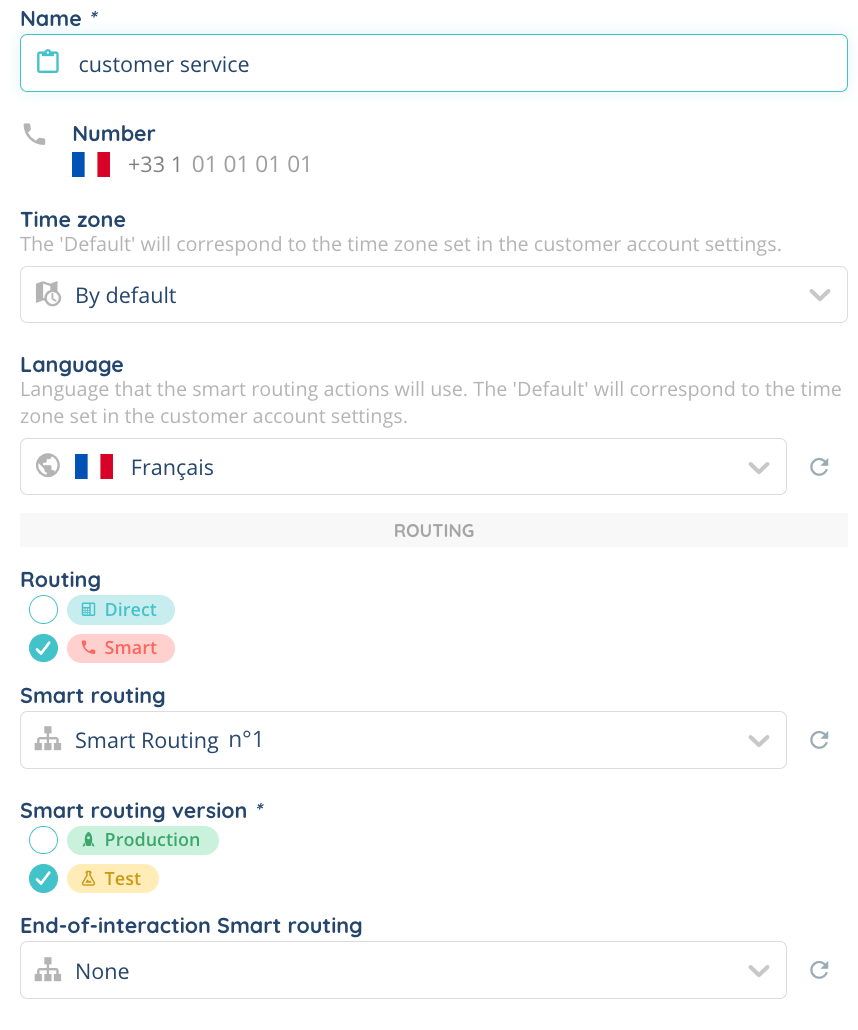
The phone number list is displayed in a table with several columns:
-
Number: The assigned phone number.
-
Name: The name associated with the number.
-
Time zone: The time zone applied to the number (default or custom).
-
Language: The language assigned to the number (default or custom).
-
Routing: The routing type assigned to the number. Two options are available:
-
Direct: Requires assigning a specific user to the number.
-
Smart: Uses smart routing, which can be configured as test or production.
-
-
Smart routing: Configuration of smart routing in test or production mode.
-
End-of-interaction routing: Routing applied at the end of an interaction.
-
User: Only applicable for direct routing.
Searching and filtering numbers
-
Search bar: Allows you to search for a number by name or directly by its number.
-
Tag filters: A dropdown menu lets you filter numbers based on assigned tags.
Editing a number
Each number can be modified by clicking the pencil button. This action allows you to change the parameters related to the number.
History and tag management
The cogged wheel icon button provides access to two features:
- Number history: View modifications and changes made to the number.
- Tag management: Assign tags to the number for better organization and searchability.