
[Reading time: 1 minute]
Overview
Limitations refer to restrictions or constraints that govern the operation, performance or capabilities of the software.

They are set up by default by INO and concern:
- the Maker (users, media, cases, tasks, etc.)
- the Supervision (quality management)
- the Reporter (explorer, dashboard, KPIs, etc.)
- the Banner (invoices, evaluations, etc.)
Configuring (Maker)
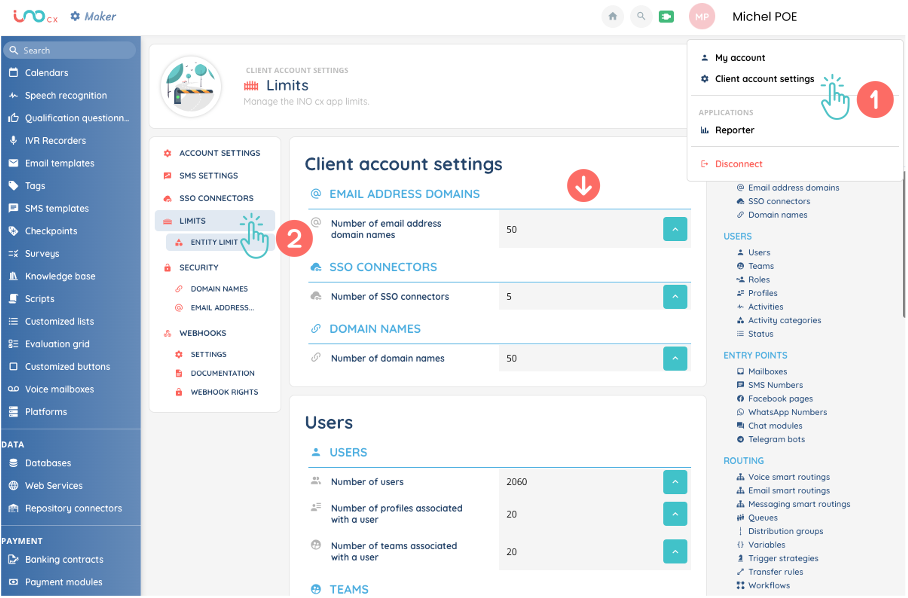
The predefined limits are generally sufficient.
However, you may need to increase these limits, depending on the size of your call centre, the organisation of your teams, your strategy, the way your company operates, etc.
You can request a limit increase from our support team. This request will be processed by our services and may be granted on a case-by-case basis if technical constraints allow.
Requesting a limit increase
There are 2 ways to increase these limits.
- You can make this request directly in the customer account settings, where you will find all the existing limits in one place.
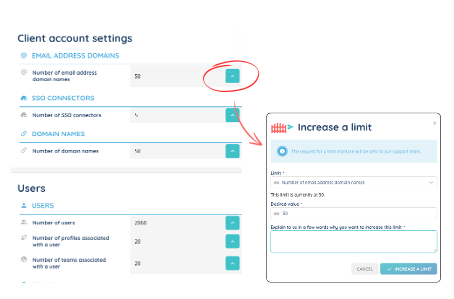
2. You can make this request directly in the sub-module concerned.
Note: Requests directly in the entity will only be possible once the limit has already been reached. A pop-up will open informing you that the limit has been reached. Click on the checkbox ten fill the fields to request a limit increase.
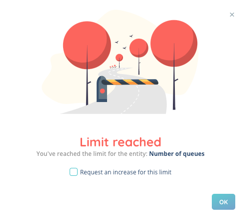
Note: You can ask for as many increases as you need. Please note that this request will be assessed and granted if it is possible.