
Prerequisites
Please note that you need a computer to use INO cx.
Here are the hardware requirements for optimal use of INO CX.
Login URL
- https://clientname.ino.cx
Web connection
- https &wss (banner), UDP (voice) protocols.
- Ports TCP 443 & 8089 (banner) & UDP 10000-30000 (voice).
- Internet speed ~200 kbit/s minimum per agent for WebRTC audio/signaling stream (per call, PCMA codec), it is recommended around 1 Mb/s for relatively smooth use of the Banner.
Using the “Supervision” feature may require a higher minimum data rate.
Internet speed: minimum 1 Mb/s per agent when using the collaborative mode, depending on the number of participants and the quality of the video streams, the minimum speed required may change.
Here are some examples of minimum bitrates for a single stream depending on the chosen quality:
- 180p video = 200 kbps
- 360p video = 500 kbps
- 720p video (HD) = 2500 kbit/s
Out of the Banner: latency (ping) between agent and INO cx < 100 ms and jitter < 20 ms, packet loss < 0.5 %.
Audio transmission via UDP (ports 10 000 to 30 000), no support for Strict NAT (Symmetric NAT).
“SIP ALG” should not be enabled on routers/firewalls , which should be sized to support the flow of all the connected agents. The use of Wi-Fi networks is not recommended.
Allow outgoing UDP packets from the browser to the internet as well as incoming reply streams.
“UDP Hole Punching” method (described in RFC5128) used when establishing the WebRTC session and ICE/STUN should not be interfered with.
Web browsers
⚠️ Google Chrome is required for this software. Use of any other browser is entirely at your own risk and unsupported.
Google Chrome 120.0 (December 2023) and above.
Allow pop-ups.
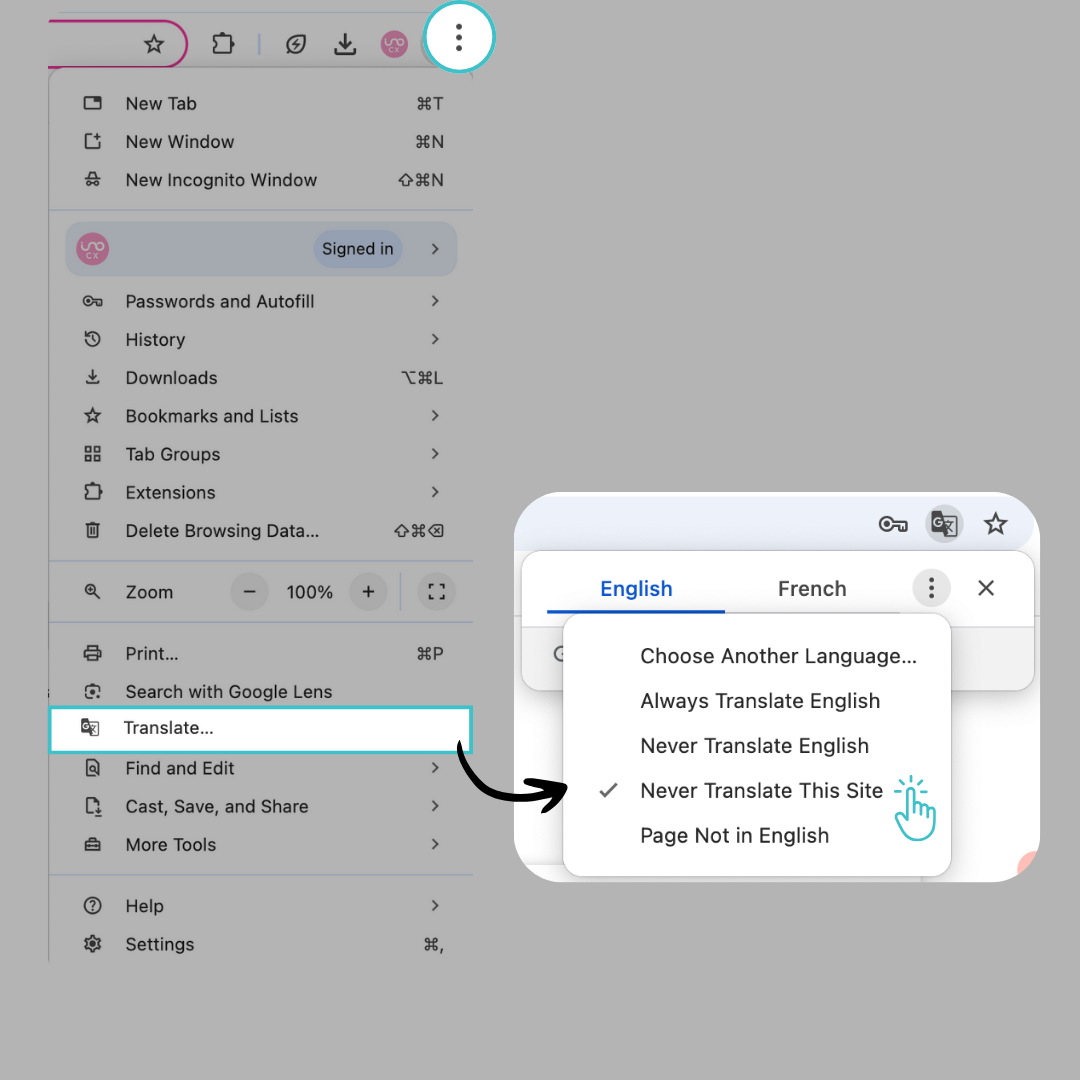
Disable Google Translate for all INO cx applications (Maker, Banner, Reporter).
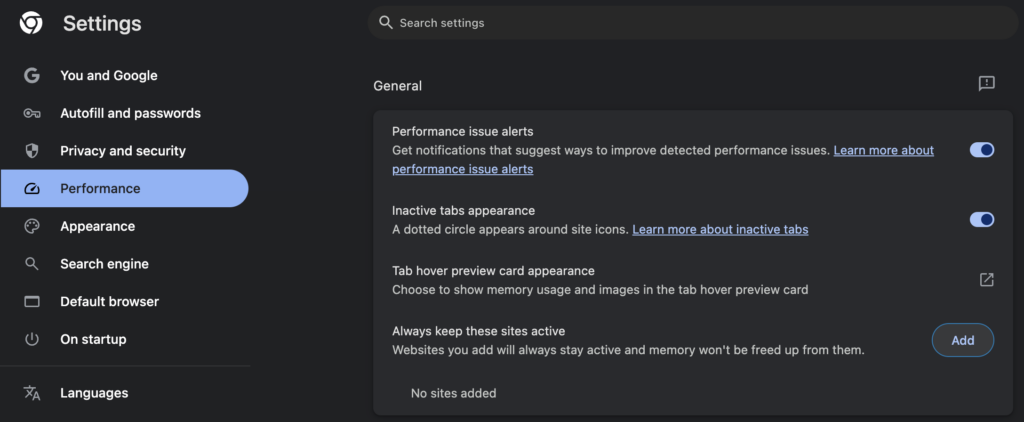
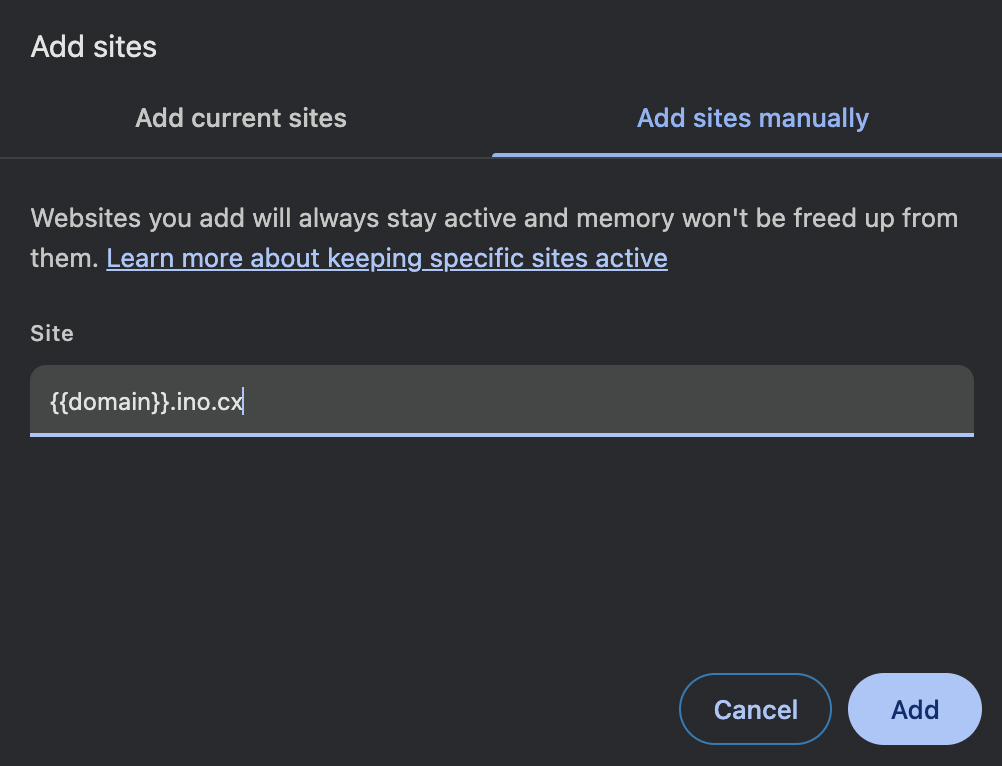
In Settings > Performance > General, click Add to Always keep these sites active. Add your client name URL {{domain}}.ino.cx.
Cookies
Allow cookies storage.
Javascript
Allow JavaScript execution.
Browser cache
To ensure the deployment of updates, disable the browser cache.
Sound
To be able to hear interaction ringtones and notifications, the “Sound” setting must be enabled in Chrome.
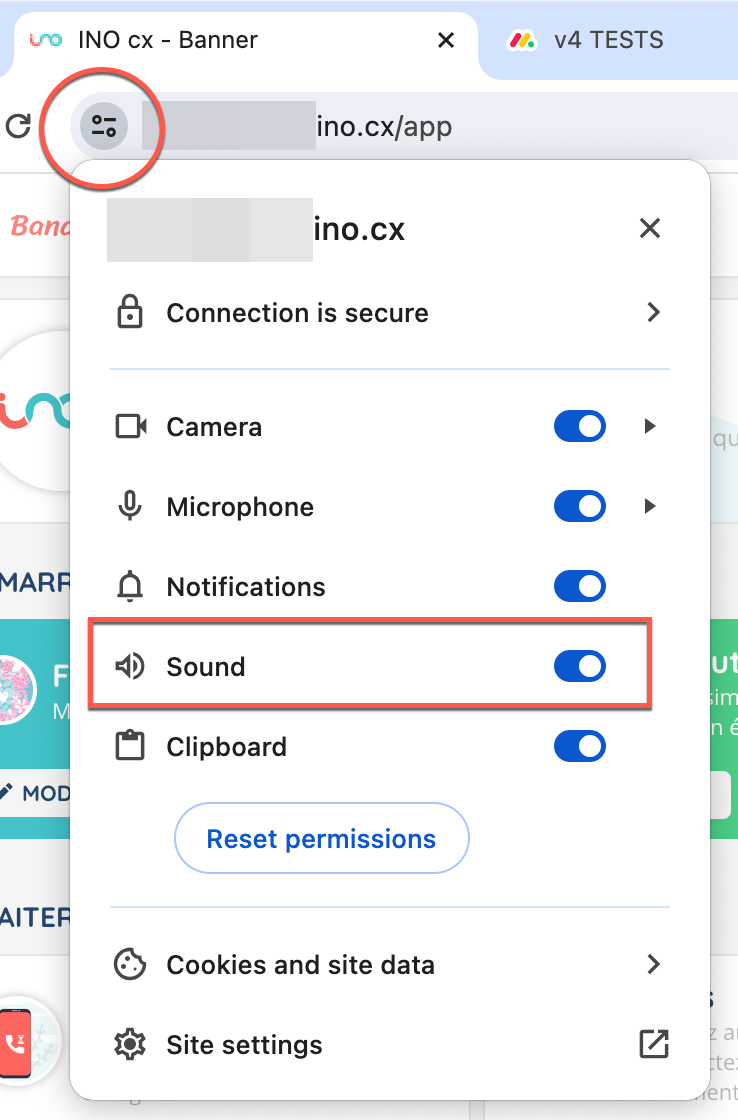
If the option is not present, it must be added by clicking on “Site settings”.
Desktop notifications
To use desktop notifications, do not set your computer to ‘do not disturb’ mode.
To ensure the browser does not consider you as ‘inactive’, you must also have clicked at least once inside the tab (this applies to SSO users or any user who has refreshed the page).
Operating system
Microsoft Windows 10 and up.
Mac OS X Monterey 12 and up.
No Chromebook.
Warning: on the agent/supervisor Banner, please do not use the full screen mode with your Mac.
Hardware
Minimum screen size and resolution: 1280 x 800 px.
CPU: 8th generation Intel processor (⚠ Celeron, N, J, Gold & Silver range not recommended) or AMD Zen architecture (excluding APU range).
RAM: 8Go (minimum).
If Macintosh: Intel range year >= 2019 or M1/M2 and above
protocol support
TLSv1.2 required.
For the agent/supervisor Banner, please add:
- Interco telephone (only in DID agent mode)
- 1 DID per station (not necessary if the agent is using WebRTC)
IP addresses to be authorized for STUN (in Europe) :
63.176.233.211
3.66.31.163
3.124.81.71
WebRTC
For webRTC, you must provide:
- ~200 kbit/s minimum per agent for WebRTC audio/signaling stream (per call, PCMA codec) – excluding bandwidth.
- Latency (ping) between agent and INO cx < 100 ms and jitter < 20 ms.
- Packet loss < 0.5%.
- Audio transmission via UDP (ports 10 000 to 30 000).
- No support for Strict NAT (Symmetric NAT), the “SIP ALG” function must not be activated on firewalls and proxy.
- TLS v1.2 for signaling (https/webRTC).
If a security proxy (e.g. Zscaler or similar solution) is used, make sure it does not block, inspect or alter WebRTC traffic. Otherwise, audio issues may occur.