
[Reading time: 5 minutes]
This article explains how to connect INO cx to an external telephony system or to an ElevenLabs voice agent with a SIP endpoint, and how to send calls to it from a voice smart routing. For the other actions of a voice smart routing, see Voice smart routing actions.
Overview
A SIP endpoint is the address of a telephony system outside INO cx: your own telephony server, a dedicated SIP trunk, or an ElevenLabs voice agent. You create it once in the Maker, then send calls to it from a voice smart routing with the Distribution to SIP endpoint action.
The action can also send information about the call along with it, in custom SIP headers: for example the customer’s reference, so that the system that receives the call knows who is calling.
There are two types of SIP endpoint:
| Endpoint type | Use it for |
|---|---|
| Generic | Any telephony system: your own server, a SIP trunk, a private network. You enter every setting yourself. |
| ElevenLabs | An ElevenLabs voice agent. INO cx prefills the recommended settings and enforces the ones ElevenLabs requires. |
Note: In most cases, the SIP trunks you need are set up with your platform. You only create a SIP endpoint to send calls to another system.
1. Prerequisites
- A Smart license.
- A role with the rights on SIP endpoints, and on Smart routing to use them in a smart routing.
- The connection details given by your telephony provider: address, transport, port, user name, password and, if needed, realm.
- For ElevenLabs: the user name and password set in the SIP trunk of your ElevenLabs phone number.
2. The list of SIP endpoints
In the Maker, open the SIP endpoints module. The list shows, for each endpoint:
- SIP endpoint: the address of the server
- Endpoint type: Generic or ElevenLabs
- Transport: UDP, TCP or TLS
- Port
- Reference
- Codec
- User name
On each row, the pencil edits the endpoint, the bin deletes it, and the gear menu offers Duplicate and History.
3. Creating a SIP endpoint
- Click Create.
- Choose the Endpoint type: Generic or ElevenLabs.
- Fill in the fields described below.
- Click Add SIP endpoint.
| Field | What to enter |
|---|---|
| SIP endpoint | The address of the telephony server: a domain name or an IP address. |
| Transport | UDP, TCP or TLS, as required by your provider. TLS encrypts the call signaling. |
| Port | Prefilled according to the transport: 5060 in UDP and TCP, 5061 in TLS. Change it only if your provider asks you to. |
| Audio encryption | Not encrypted (RTP) or Encrypted (SRTP). Encrypted (SRTP) is only available with TLS. |
| Reference | A unique name to recognize the endpoint, for example in smart routings. |
| Codec | The audio format: alaw, ulaw or alaw,ulaw (the default). It must be supported by your provider. |
| User name | The user name given by your provider, 6 to 20 characters. |
| Password | The password given by your provider, 30 characters maximum. |
| Realm | Only if your provider asks for it. |
A few rules on the port and the encryption:
- In TLS, port 5060 is not allowed. Another port than 5061 is allowed, with a warning, because it is not the standard TLS port.
- Audio encryption must match your provider’s setting. If your provider requires encryption, choose TLS and Encrypted (SRTP), otherwise calls fail.
- If you switch from TLS to UDP or TCP, the audio encryption goes back to Not encrypted (RTP).
4. Connecting an ElevenLabs voice agent
With the ElevenLabs type, INO cx shows the Predefined ElevenLabs configuration box and sets up the endpoint for you:
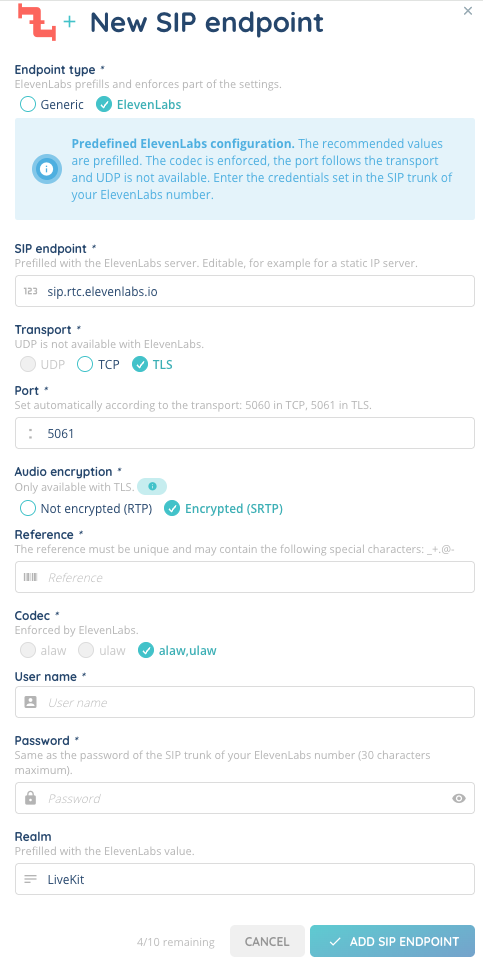
- SIP endpoint and Realm are prefilled with the ElevenLabs values, if they are empty. You can change them, for example for an ElevenLabs server with a static IP address.
- UDP is not available: choose TLS (port 5061) or TCP (port 5060). The port follows the transport and cannot be changed.
- In TLS, Encrypted (SRTP) is selected by default. You can change it.
- The codec is set to alaw,ulaw and cannot be changed.
- Realm is required.
Enter in User name and Password the credentials set in the SIP trunk of your ElevenLabs phone number.
The audio encryption must be compatible with the Media encryption setting of your ElevenLabs SIP trunk:
| In INO cx | In ElevenLabs |
|---|---|
| Encrypted (SRTP) | Allowed or Required |
| Not encrypted (RTP) | Allowed or Disabled |
Warning: If ElevenLabs is set to Required, the TCP transport cannot be used: calls fail. Choose TLS and Encrypted (SRTP).
5. Sending calls to a SIP endpoint from a smart routing
- Open your voice smart routing, in a development version.
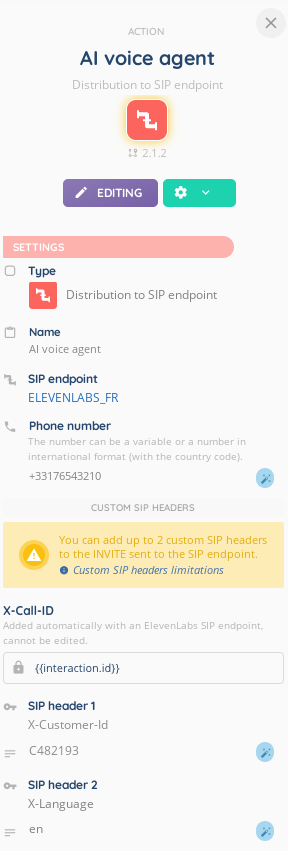
- Add the Distribution to SIP endpoint action.
- Select the SIP endpoint in the list. Each endpoint shows its reference, then its address and port, for example
ELEVENLABS_FR (sip.rtc.elevenlabs.io:5061). - Enter the Phone number to call on the SIP endpoint: a number in international format, or a variable.
- If needed, add Custom SIP headers (see below).
Note: An action that identified the SIP endpoint by its code opens without a SIP endpoint: select one in the list before saving.
5.1. Custom SIP headers
A custom SIP header sends a piece of information to the SIP endpoint along with the call. Click Add a SIP header, then fill in:
- SIP header: the name of the header, for example
X-Customer-Id. Agree on it with the system that receives the call. - Header value: a fixed text, magic variables, or both. For example, a variable holding the customer reference collected earlier in the smart routing.
You can add up to 3 custom headers. With an ElevenLabs endpoint, INO cx adds the X-Call-ID header on its own, with the ID of the interaction: it is shown first and cannot be changed, and 2 custom headers remain available. ElevenLabs can use this ID to link the conversation to the INO cx interaction.
The rules, also listed in the Custom SIP headers limitations window (link in the yellow box):
- Name: starts with
X-, then only letters, digits and hyphens, with no hyphen at the end, 32 characters maximum. Some prefixes are reserved. Two headers cannot have the same name. - Value: 64 characters maximum, letters, digits, accents, spaces, hyphens and underscores. No punctuation, no line break.
- Keep the values short: identifiers or numbers rather than long texts. If your headers are large, prefer the TCP or TLS transport.
5.2. When a value is not valid during a call
The rules on the value are checked again during the call, once the variables are replaced. An invalid value does not block the call: the SIP endpoint is still called, and the header is sent with an error code instead of its value.
| Error code | Cause |
|---|---|
ERR_PAYLOAD_EMPTY | The value is empty, for example a variable with no value for this call. |
ERR_PAYLOAD_LENGTH | The value is longer than 64 characters. |
ERR_PAYLOAD_FORMAT | The value contains forbidden characters, such as punctuation or a line break. |
6. Managing SIP endpoints
- Editing: calls use the new settings as soon as you save, including a new address or port.
- Changing the type: if a Generic endpoint with 3 custom headers in an action becomes ElevenLabs, the third header shows a red Not sent box. It is no longer sent, and the action cannot be saved until you delete one header.
- Deleting: a SIP endpoint used by a smart routing action cannot be deleted, even if only an inactive version of the smart routing uses it. Remove it from the smart routings first.